Computing Tech

Galaxy Watch 4: Samsung is coming for Apple Watch's crown with Wear OS 3


Galaxy Watch 4: Samsung is coming for Apple Watch's crown with Wear OS 3

There's one clear go-to smartwatch for iOS: the Apple Watch. But for Android, there hasn't been a singular option. Will the Samsung Galaxy Watch 4 finally be that watch? At Samsung's newest folding-phone-focused Unpacked announcement  where the latest Galaxy Z Fold 3 and Z Flip 3 phones were unveiled, the company also announced the Galaxy Watch 4 and Watch 4 Classic -- which can be preordered now and go on sale Aug. 27. I've already started to wear them and test them: here's the full review. They're the first Samsung watches to have the Google co-designed Wear OS 3, which isn't coming to other smartwatches until next year. Following the already-excellent Watch Active 3, will the Galaxy Watch 4 be even better? It certainly looks like it.

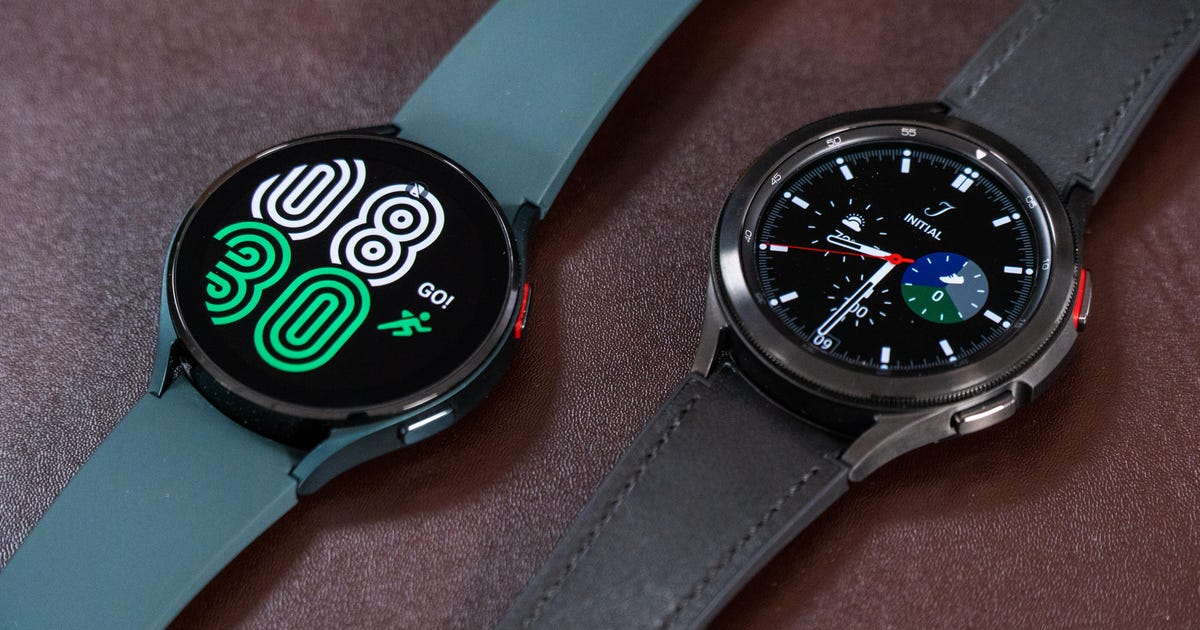
Much like previous Samsung watches, there are two designs: a sleeker, less expensive Watch 4 and a more traditional-looking Watch 4 Classic. The latter brings back Samsung's physically rotating outer bezel and has more traditional watch-like looks and straps. The prices ramp up based on either design ($250 for the aluminum 40mm Watch 4, $350 for the stainless steel 42mm Watch 4 Classic), size (the larger 44mm Watch 4/46mm Watch 4 Classic cost an extra $30) or LTE data compatibility (an extra $50 on top of that). In the UK, the Watch 4 starts at £249, and the Classic at £349. Australian prices are TBD.

Samsung's watches have always been good. Then there's also been Fitbit and even Google Wear OS. But Samsung's Galaxy Watch 4 is looking to tie it all together and reboot the Android watch landscape by finally not having a weird split between Samsung's watch experience and Google's. 

Promises of better watch-phone connection

The Watch 4's new Google- and Samsung-developed OS will eventually show up on other smartwatches. But for Samsung's newest watches, it should mean a more Android-fluid connected experience. Notifications, calls, controlling your phone, syncing with your phone settings: Samsung promises that the Watch 4 will do all this better than previous watches. Samsung's also promising better battery life and speedier performance. That battery life may still only be about two days, but it'll be enough to go to bed with and track sleep overnight. Samsung also renamed its watch: The Watch Active name is gone. (Welcome back, Galaxy Watch.)

The Galaxy Watch 4 is only made for Android phones, with no plans for iOS compatibility right now. While previous Wear OS and Samsung watches could pair with iPhones, the Watch 4 is clearly made to be a seamlessly connecting watch for Android (and specifically Samsung) phones. Samsung's "One UI" philosophy is about syncing wallpapers, designs and settings across phone and watch. Will the watch feel like a seamless extension of the phone? We'll see when we test-drive one.

Samsung Galaxy Watch 4 and Samsung Galaxy Watch 4 Classic

The new rear sensor array includes electrical bioimpedance, which promises scale-like body fat/BMI estimates.

Drew Evans/CNET

Health tech: Snore detection and bioimpedance-based body analysis

There are several new health features on the Watch 4 on top of the ones that carried over from the Samsung Galaxy Watch 3. Besides heart rate, blood oxygen and electrocardiogram (and stress-sensing/blood pressure testing that requires calibration with a blood pressure cuff), Samsung is adding a few extras to sleep tracking. Snore detection works using the paired Android phone's microphone, and the blood oxygen checks now run continuously once a minute overnight (or as a spot-check during the day).

Samsung also added a new sensor to its rear array: an electrical bioimpedance sensor for full-body analysis using a weak electrical current to measure how conductive you are -- and therefore showing what you're made of. This type of sensor tech hasn't been on recent smartwatches; the last wearable I remember promising bioimpedance was the Jawbone Up 3

When using the body analysis feature, there will be readouts on your BMI, muscle mass and body water along with body fat percentages, much like some scales. I'm not sure how I feel about that! Samsung Health will use this readout to calculate a range of where your health is compared to optimal levels. 

New sensor tech is always a toss-up: Will it work? Will it be useful? We don't know yet. Samsung is aiming for this to be a comprehensive body analysis tool, which sounds awfully ambitious. Last year, the Fitbit Sense also introduced new electrodermal stress-detection sensors, but I never found them meaningful in my everyday life. Jury's still out on the bioimpedance features, too.

Samsung Health remains the fitness and health platform default for the Galaxy Watch 4, despite the OS change. But a shift to Google Play for apps and new support for watch face complications should mean a lot of fitness apps make the shift, too. (Complications are basically those little watch-face widgets that show data from other apps, and they're pretty helpful.) Samsung's already announced that Strava, Calm and Adidas Running are supported. Spotify's also supported for on-watch music playback.
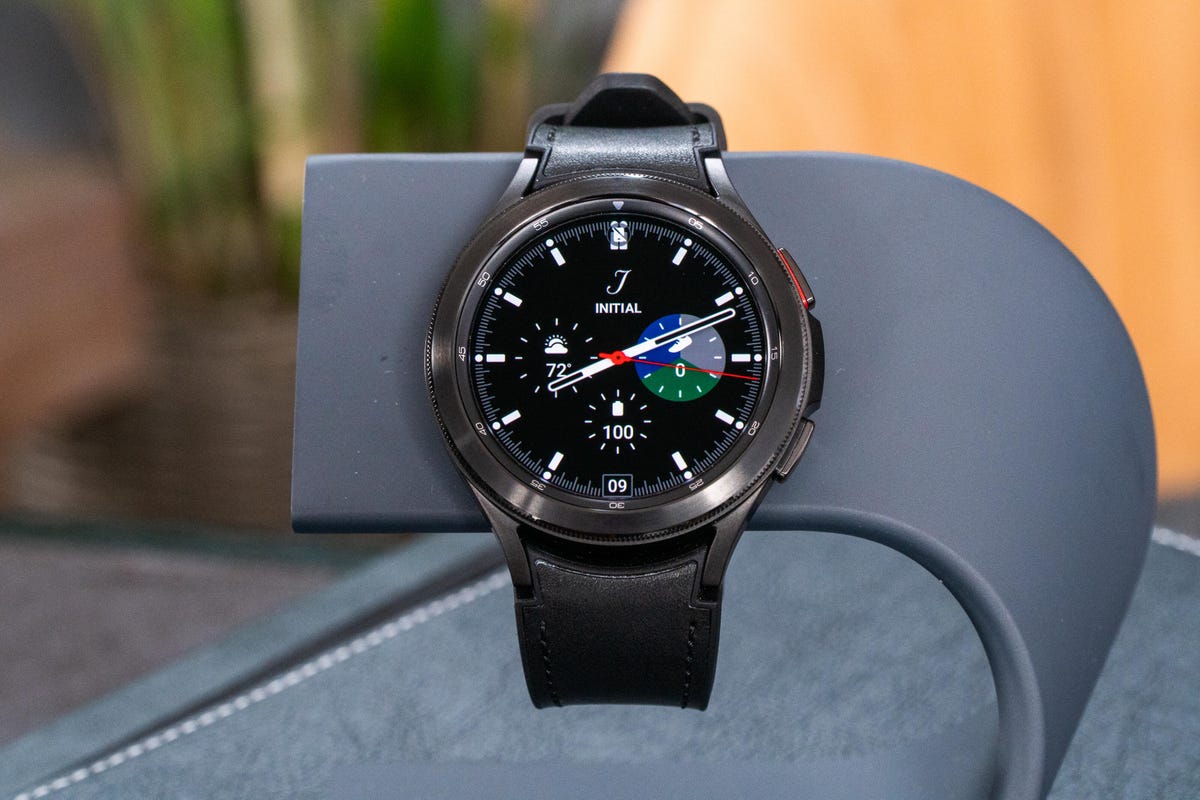
Samsung Galaxy Watch 4 and Samsung Galaxy Watch 4 Classic

See that rotating bezel? It's back.

Drew Evans/CNET

Boosted specs

The Watch 4's new processor should be faster than the last Watch 3 (20% faster CPU and 50% faster GPU, according to Samsung) and there's more RAM (1.5GB) and storage (16GB) than before. That should make animations and app-launching speedier. The Super AMOLED display is sharper: the 1.2-inch 42 and 40mm models have a 396x396-pixel resolution, while the 1.4-inch 44 and 46mm models are 450x450. The watches can also quick charge, gaining 10 hours of battery life on a 30-minute charge.

The rotating bezel is back

Both the Watch 4 and Watch 4 Classic lean heavily on touching the outer rim of the watch to "spin" and navigate: the Watch 4 has a touch-sensitive rim, while the Classic has a physical rotating bezel. Samsung's also putting touch controls into these watches to allow swipe navigation, much like Wear OS watches. You can choose how to interact.

A few other buttons on the side of the watch control moving back and forth in the interface and can be reprogrammed. One can be pressed and held for Samsung's Bixby assistant; the other for Samsung Pay. But you can make Google Assistant and Google Pay the go-to apps instead.

5-3p-apps.png

Some of the Google apps on the Galaxy Watch 4 have a familiar Google look.

Google

Google apps onboard

Google's Wear OS 3 being on the Galaxy Watch 4 means it'll hook into Google Play, but it's also getting some revamped Google apps. Google's already committed to new YouTube, Google Maps, Google Pay and Messages apps, which have new designs for Wear OS 3. There are also third-party updates with new Tiles: Calm, Komoot, MyFitnessPal, Period Tracker, Sleep Cycle, Spotify and Strava are among the first to get updates. Google is committing to rolling out more updates over time, meaning that both Samsung and Google should be keeping this watch full of apps.

But you're stuck with Bixby for now. Samsung's voice assistant is still the default on the watch, which comes up when pressing and holding the top button. Google Assistant isn't available at the moment, which is frustrating -- that's one of the top things I'd want to access on a Google-connected watch.

Could this be the best Android watch?

The Galaxy Watch 4 looks like the ultimate fusion of a Samsung watch with Google watches -- and that could be a winning formula for using Google Maps, connected phone features and third-party fitness apps on Google Play, which is the Galaxy Watch 4's default app store. It should be the hardware-boosted Google watch that we've been waiting years for. The software interface seems exactly like what you'd expect: part Samsung, part Google. But is it worth waiting to see how it works out, or should you just go for this first model? Hard to tell, since it's the first of its kind.

It's not surprising that Samsung's new health features and its new OS aren't coming to older Samsung watches for now. Some of them might, but expect this to largely be a clean break and a reboot. And we also don't really know how many of the Galaxy Watch 4's features will carry over to the rest of Google's future Wear OS 3 watch lineup, which will include watches from Mobvoi, Fossil and eventually Fitbit.

Those Wear OS 3 watch updates won't come to those other watches until 2022, which makes the Galaxy Watch 4 the only new Google-connected Wear OS 3 watch this year. For that reason alone, it could very well be the best Android watch of the moment. As to how it actually feels and works? We'll have full hands-on impressions and a review in the days ahead... but the Galaxy Watch 4 looks extremely promising for any Android phone owner who wants a much more hooked-in watch.

§

Google's new Samsung-codesigned version of Wear OS is officially called Wear OS 3, and it'll be on Samsung's next-gen Galaxy Watch soon. But for many watch owners it won't arrive until 2022. Or, you won't be able to get the new software at all.

The latest news comes from a new update from Google, which will make watches eligible for the next version of Wear OS. According to Google, which shared the information with CNET, Mobvoi's TicWatch Pro 3 GPS, TicWatch Pro 3 cellular, and TicWatch E3 will get the upgrade, along with Fossil's next-gen smartwatches, which are coming this fall. But that software update won't be coming in 2021. Instead, it'll be in the middle of next year.

Fossil shared news of its next-gen smartwatches with CNET earlier this year, but now it looks like Fossil's watches (and Mobvoi's) won't have Wear OS 3 to start, instead they'll come with an option to upgrade the OS in the "mid to second half of 2022."

Google also cautions that the OS update involves a complete reboot to factory settings, and that for some watches the "user experiences will be impacted," suggesting some people could choose to keep the previous version of Wear OS. Google wouldn't clarify what those "impacted" experiences will be, but told CNET via email that it will "share more at the time of upgrade so users can make an informed decision."

Other Wear OS watches won't get Wear OS 3, as Google had indicated before, but some future software features are still expected, with security updates for at least "two years from device launch."

Samsung is expected to announce its newest Galaxy Watch on Aug. 11 during its summer Unpacked event. That watch will have Google's Wear OS 3, making it the only Wear OS 3 watch that's confirmed for 2021. Google wouldn't confirm whether other Wear OS 3 watches are expected this year or not, but for now it looks like Samsung may have an exclusive window on its Wear OS partnership.


Source
Tags:


WhatsApp's Multidevice Feature Could Teach Apple's iMessage Some New Tricks


WhatsApp's Multidevice Feature Could Teach Apple's iMessage Some New Tricks

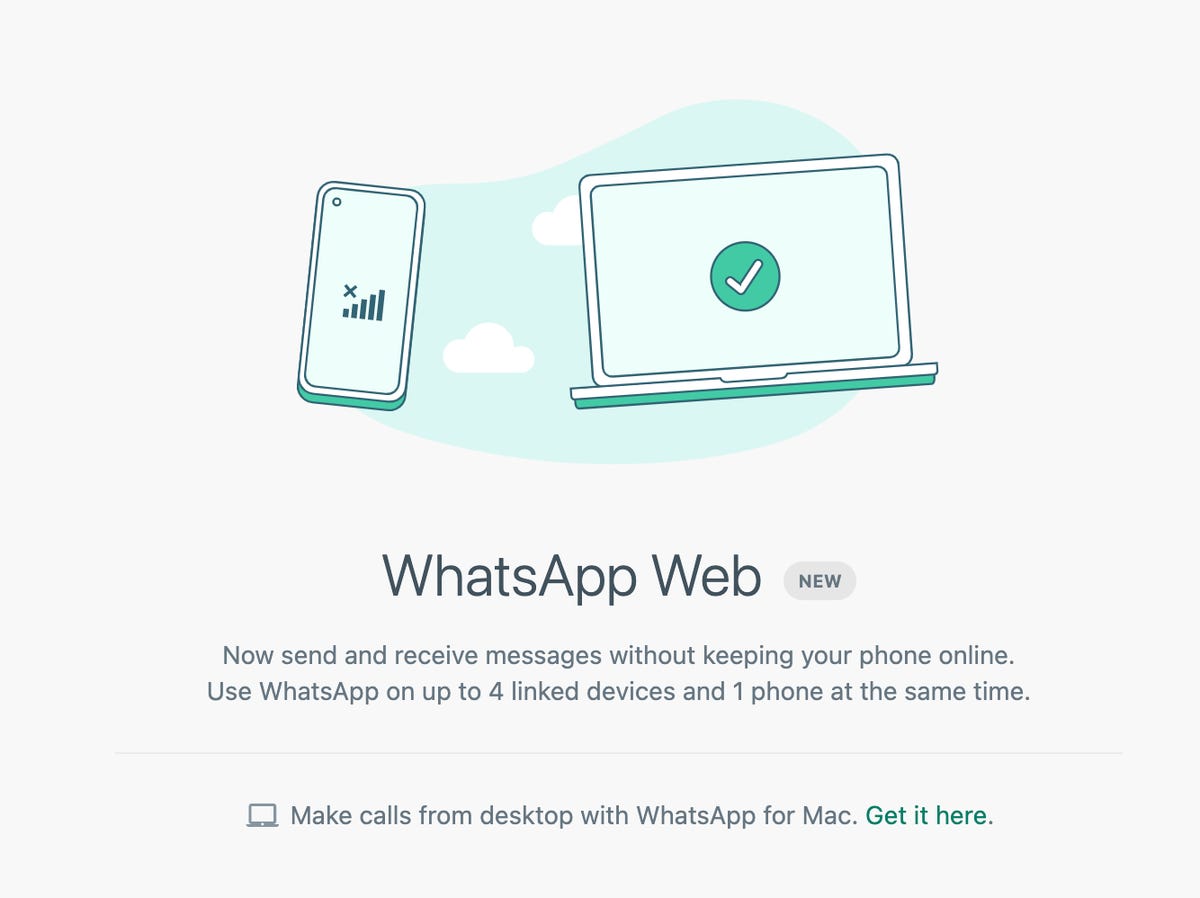
Your phone doesn't need to be working to access texts on WhatsApps. Thanks to the web and desktop app's new Linked Devices feature, previously in beta and rolling out to the public over the next several months, you can get faster access to chats from nearly any computer or tablet you choose, while preserving much of the encryption and security that the app is known for. WhatsApps newest feature creates a cross-platform texting experience that reminds me of using iMessage across Mac and an iPhone -- but without the requirement of being stuck on just Apple's devices.

WhatsApp's desktop apps are not new, to be clear. However, they previously required a constant connection with your phone in order to function. If your phone powered off or was temporarily lost, you essentially couldn't access your texts at all. Other Meta-owned services like Messenger don't have this limitation, but at the cost to your privacy of not having end-to-end encryption on by default.

WhatsApp now lets you pick as many as four devices aside from your phone that can send and receive WhatsApp messages. You set up these devices by scanning a QR code generated on WhatsApp's website or desktop app with the WhatsApp app on your phone, and after that they're listed as "Linked Devices" within your account. From that point on, that browser or desktop app will be able to access your WhatsApp texts regardless of whether your phone is around. In addition to that flexibility, I also found WhatsApp would simply boot up much faster across the devices I tested, which include my work Mac, a Chromebook and an iPad.

I wouldn't call WhatsApp's multidevice system perfect yet, and other messaging apps like Signal and Telegram do offer similar solutions, so let's go over a few more of the ins and outs for WhatsApp's particular multidevice setup.

whatsapp-multidevice.png

When your WhatsApp account receives the new linked devices feature, you'll receive a message similar to this one.

WhatsApp

Works on nearly any device, but not nearly every feature

The best part of the new WhatsApp multidevice launch is speed. As I outlined earlier, I can flip back and forth between different devices across several operating systems, and keep up with group chats or quick texts seamlessly. However, some features like video and voice calling only work on WhatsApp's Windows, MacOS and mobile apps. The web version that I use on my Chromebook and iPad don't have access to those calling features.

You can access linked devices within WhatsApp's settings. 

Screenshot by Mike Sorrentino/CNET

WhatsApp also spells out other omissions that linked devices don't yet support, which include clearing or deleting chats from a linked device if you use WhatsApp on an iPhone and viewing live location.

And even though a linked device won't need a connection to your phone, the new WhatsApp feature still requires a phone in order to get started. During setup, your phone will send your device a copy of your most recent message history.

Linked devices also rely on your phone using WhatsApp in order to stay logged in. If you don't log in to WhatsApp for 14 days from your phone -- whether because you lost the phone or perhaps you only use WhatsApp very occasionally for specific contacts -- all linked devices will get logged out.

I also found that one could inadvertently fill up their linked device limit quickly. Should you use the WhatsApp desktop app and WhatsApp for web on the same computer, WhatsApp will see that as two devices. If you clear your cache on your web browser, and then log in again to WhatsApp on that web browser, it will also come up as a new linked device. It's easy enough to remove linked devices from your settings, but it's worthwhile that some device management could come up faster than you'd expect.

Also for now, smartwatches aren't able to be a linked device, nor is WhatsApp offering an Apple Watch app. I do find it easy enough to use WhatsApp from an Apple Watch by replying to notifications, but you can't start new messages with this method. I'm aware of third-party Apple Watch apps in the App Store that unofficially integrate with WhatsApp, but I would be wary about providing an additional party access to that.

Now can every texting service copy this, please?

As I mentioned before, WhatsApp's version of multidevice isn't particularly new, but there is a lot of room for other texting apps to improve their services in this cross-platform direction. Signal, whose encryption protocol WhatsApp uses, offers multidevice texting through apps on mobile, desktop and iPad, but doesn't currently support a web version for platforms where it doesn't make an app. Signal also doesn't offer cloud backups of your texts, keeping your messages located on the devices themselves. Signal does offer instructions for how to backup and restore messages, with a process that involves directly transferring your texts from phone to phone.

Android's Messages app offers encryption for texts sent over RCS, and it does have a web version -- but that web version relies on syncing directly with a phone similar to how the previous version of WhatsApp works.

Apple's iMessage works seamlessly across MacBooks, iPad tablets, the Apple Watch and the iPhone -- including encrypted texts and partial encryption for backups. The flexibility of moving between these devices has always been a high point of its iMessage service. Still, it's increasingly common for someone to use an iPhone but perhaps own a Windows PC that can't access iMessage. Or a Chromebook. Or an Android tablet. I won't go into an iMessage walled garden rant here, but when other rivals are offering services that meet customers across platforms while maintaining encryption, it becomes increasingly notable when one does not.

Encryption in text messaging apps is particularly pertinent following the European Union recently approving -- but not yet adopting -- the Digital Markets Act, which is partly intended to require leaders in the messaging space like Apple and Meta to allow interoperability. The rules are very new and are aimed at providing a more level playing field for newer services. While well-intentioned, it also creates a situation where tech companies may need to solve how to allow for that interoperability while also preserving its customers' privacy.


Source

Tags:


Asus ZenWiFi AX review: This Wi-Fi 6 mesh router hits the sweet spot


Asus ZenWiFi AX review: This Wi-Fi 6 mesh router hits the sweet spot

Fast speeds throughout your entire home. Particularly strong performance at range. Simple setup. A steady, reliable mesh that automatically steers you from band to band and routes your connection without dropping it. A tri-band design featuring a dedicated backhaul for transmissions between the router and the satellites. A future-proofed, multigig WAN port. Full support for Wi-Fi 6, the newest, fastest version of Wi-Fi.

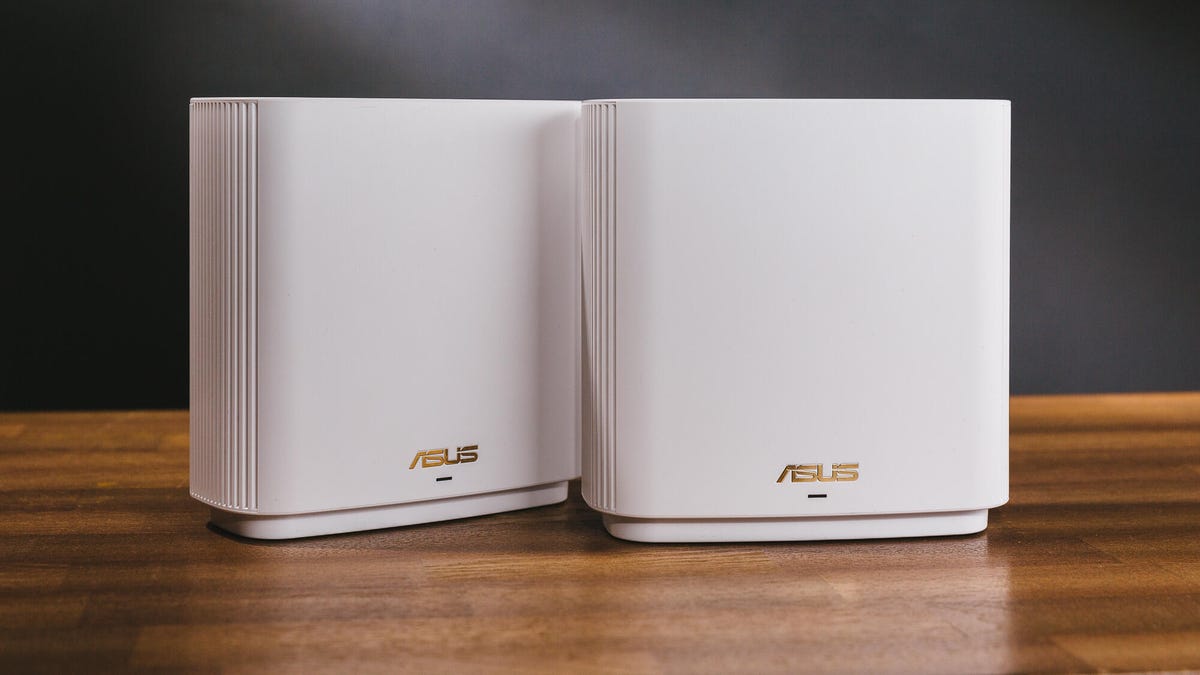
These were all reasons that the two-piece, $700 Netgear Orbi Wi-Fi 6 mesh router earned a strong review here on CNET. But I could say all of the same things about the Asus ZenWiFi AX, too -- and that two-piece system only costs $450. On top of that, the ZenWiFi AX boasts better range per device and a better array of app-based controls and customizations for your network, and it lets you use either device as router or extender (the Orbi doesn't). It even comes in your choice of white or black.

Go ahead and read that first paragraph again. If it's describing the $700 Netgear Orbi 6 mesh router, then it's detailing a very strong system, albeit an expensive one. But if we apply those same points to the $450 Asus ZenWiFi AX, then we've found the sweet spot for a mesh router upgrade, with that same high-end performance at a price that's a lot easier to swallow. That makes the new ZenWiFi system my top-rated mesh router to date, an easy Editors' Choice Award winner, and the first system I'd recommend for anyone looking for a router worth splurging on.

I had the ZenWiFi system up and running in less than 15 minutes.

Screenshots by Ry Crist/CNET

Setup and design

The first thing you'll notice as you unbox the two-piece ZenWiFi AX system is that the two pieces are identical. Either device can serve as the router or as the range-extending satellite device, which makes for setup that's essentially foolproof.

To get started, you'll just plug one of the devices in and connect it to your router with an Ethernet cable. Then, open the Asus app and follow the instructions to get your network up and running. You'll need to plug in the satellite device within 3 meters of the router in order to pair the two together (before presumably unplugging and relocating it to where you actually want it), but aside from that, the process is about as straightforward as it gets, and only took me about 10 minutes from start to finish.

You'll find a multigig WAN port, three spare Ethernet ports and a USB 3.1 port on the back of each ZenWiFi device.

Tyler Lizenby/CNET

Once your network is live, you'll be able to use the app to track speeds and tweak settings, including up-to-date touches like support for WPA3 encryption, the latest Wi-Fi security standard. The system defaults to putting out a single Wi-Fi network that automatically steers your connection between the 2.4GHz and 5GHz bands, with the second, more capable 5GHz band serving as a dedicated wireless backhaul between the router and its satellites. If you want to, you can split those bands into separate networks, which is a nice touch.

Even nicer: You can customize that backhaul connection as you see fit. If you'd rather share its bandwidth with devices on your network, you can switch to a nondedicated approach -- or you can switch the two 5GHz bands altogether, using the first as the backhaul and the second, faster band for your normal network traffic. And, if you've got Ethernet cables running through your walls, you can wire the satellites back to the router and use all three wireless bands for your network traffic.

As for the hardware itself, it's the same design as the Wi-Fi 5 version of ZenWiFi, but the aesthetic is appropriately high-end without drawing too much attention to itself. With the tall-but-not-too-tall design and antennas hidden inside, some might mistake the things for smart speakers, alarm clocks or other such tech that commonly sits out in the open in people's homes. That's good for a router -- they'll perform better if you don't feel compelled to stash them out of sight in a closet or a drawer somewhere.

You'll find a multigig WAN port on the back of each device that supports incoming wired speeds as high as 2.5Gbps, which is a nice, necessary piece of future-proofing for a router at this price. You'll also find four spare Gigabit Ethernet jacks, and a single color-changing LED status light on the front. I like the way that light turns amber in color when a firmware update is ready for download, but it took me a minute to realize that's what it meant, as the app makes no mention of amber in its LED color guide.

Regardless, the system makes an excellent first impression -- but how well does it perform? Well...

The Asus ZenWiFi AX was a middle-of-the-pack performer in our lab.

Ry Crist/CNET

Network nirvana?

The Asus ZenWiFi AX wasn't necessarily a runaway standout in our lab-based speed tests. With a top speed of 825Mbps at a close-range distance of 5 feet, it's comfortably faster than Wi-Fi 5 routers like the Eero, the Nest Wifi and the dual-band, budget-priced version of the Netgear Orbi, all of which top out at around 600Mbps. But it isn't capable of top speeds that are quite as fast as those of the fancier Wi-Fi 6 mesh routers like the AmpliFi Alien, the Arris Surfboard Max Pro or the tri-band version of the Netgear Orbi, all of which cost a few hundred dollars more than the ZenWiFi AX.

Even more of an eyebrow-raiser: the ZenWiFi AX got beat at all distances by the Netgear Nighthawk mesh router. That's a budget-priced Wi-Fi 6 system that costs about $200 less than the ZenWiFi AX.

Still, our top speed tests leave the range-extending satellite devices out of the equation, and they also don't include any walls or obstructions in between the router and our test laptop. Both of those variables will make a big impact on the way these systems perform in a real-world environment. So, I took the ZenWiFi AX home, set it up on my 300Mbps fiber internet network and then clocked the speeds throughout my smallish, shotgun-style home in Louisville, Kentucky.

The ZenWiFi AX finished with an average download speed throughout my home that was second highest among all of the Wi-Fi 6 mesh routers I've tested. Only the Wi-Fi 6 version of the Netgear Orbi was faster.

Ry Crist/CNET

The Asus system shone in these real-world tests. Over multiple days and across dozens of speed tests, the ZenWiFi AX never once dropped my connection or stalled out as I moved from room to room. In the end, it finished with an overall, whole-home average download speed of 271Mbps, or about 90% of what my internet connection is capable of. That's second only to the $700 Netgear Orbi 6 mesh system, which finished with an overall average of 288Mbps in the same spate of tests.

What's more, when I removed the range extender and reran my tests with just the router, the ZenWiFi AX jumped up to first place. In my back bathroom, the farthest room from the router and a common dead zone for single-point routers in my speed tests, I was still averaging speeds just over 250Mbps, which is excellent. Next best was the AmpliFi Alien, which averaged back-bathroom speeds of 132Mbps with the range extender unplugged. On its own, the Netgear Orbi Wi-Fi 6 router averaged a back bathroom speed of just 82Mbps. Both of those competitors returned faster top speeds in an open-floorplan lab, but the ZenWiFi AX router seems to be the more capable piece of hardware once you take obstructions into consideration.

Consider your data, too

One of the nice features in the Asus app is a Quality of Service engine that lets you prioritize traffic to specific devices on your network. It's a handy tool that you don't always get with mesh routers like these.

Screenshots by Ry Crist/CNET

But when you go to turn the feature on, the app alerts you to the fact that using the Quality of Service engine requires you to agree to the terms and conditions for a third-party company called Trend Micro. That company runs the software that powers the Asus QoS engine, and "your information will be collected," Asus says.

"Asus is not responsible for neither the agreement between you and Trend Micro nor any content of the service provided by Trend Micro," the statement reads (presumably the double negative is unintentional). "Please refer to the privacy-related statement issued by Trend Micro or contact Trend Micro for more details."

Fine print directing you to read more fine print, and from a company you've likely never heard of. Wonderful.

At any rate, I made sure to give that Trend Micro privacy policy a read. It's 21 pages long, but the part that seems to apply most to ZenWiFi users starts on Page 9. 

When you use Trend Micro products like the Asus QoS engine, the policy reads, Trend Micro collects personal data that may include your name, phone number, email address and device ID.

"We use this personal information to ensure that the relevant customer's license to our solutions is valid, and to contact our customers regarding renewals, technical issues and new product information."

The policy goes on to get more granular about the types of data Trend Micro collects, and it links out to a separate data disclosure document (again, fine print directing you to read other fine print). That data disclosure lists five specific purposes for which Trend Micro collects user information, and the specific types of user information that each purpose collects. I asked Asus which of the five functions on the list applied to the QoS engine. Per Asus, it was actually four of them -- and between them, the data collected includes source and destination IP addresses, URLs, file names and file paths.

This is where I jumped back over to the Trend Micro privacy policy:

To me, that's all but an admission that sensitive data is, in fact, getting scooped up by Trend Micro's processors. And even if the company says it doesn't want or need that type of information in particular, it still wants your information as a whole. Much of that may be for legitimate purposes, like monitoring network traffic for potential threats -- but the policy also admits to using personal information for marketing: "We may also use personal information for other business purposes, including keeping existing and past Customers informed about our Products, Services and promotions."

I'll also point out that Trend Micro's legalese keeps things pretty vague when describing how it keeps user data secure, mentioning only "appropriate security measures" that restrict access to "authorized personnel only."

I give Asus some credit for alerting you to the privacy implications in a fairly straightforward manner as soon as you try to turn the QoS engine on. Still, I wouldn't recommend doing so unless you're certain that you need it (and most almost certainly won't).

Tyler Lizenby/CNET

The verdict

Privacy gripes aside, the Asus ZenWiFi AX is an excellent mesh router. It feels every bit the part of a high-end upgrade, and nearly managed to match the best-in-class performance of the Wi-Fi 6 version of the Netgear Orbi despite costing hundreds less than that system. The ZenWiFi AX system was a cinch to set up and use, it offers a much stronger degree of customization than you typically get with a mesh system and it performed like a champ, keeping speeds high throughout all corners of my home and never dropping my signal as I moved from room to room.

At $450, this is still a splurge, no doubt about it. But the Asus ZenWiFi AX is well worth the cash if you're looking for the best value possible from a high-end, Wi-Fi 6mesh router system with a dedicated backhaul band. If you're looking for an upgrade, put it right at the top of your list.

Originally published March 1.
Update, March 2: Updated to reflect that the ZenWiFi AX supports WPA3 security.


Source

Tags:


Apple's iMessage Should Improve Texting to Android and Other Phones


Apple's iMessage Should Improve Texting to Android and Other Phones

Apple's iMessage is getting a major overhaul later this year with iOS 16, but most of these new features, like unsending a message or editing a text, will only work if the person you are texting also has an iPhone. 

Since Apple has full control over its messaging platform, iPhone owners get a consistent experience that works well regardless of the carrier or specific iPhone model. But it's also inadvertently created a long history of separating people into "blue" and "green" bubbles based on whether they're using an iPhone or Android phone. Apple also relies on the dated MMS standard for non-iMessage group chats, which results in a lack of support for modern features like read receipts and higher-quality images.

While social pressures among those that do and do not show up as a blue bubble have been frequently documented, such as in the Wall Street Journal among teens and young people, the much bigger issue revolves around universal communication. There is no single, modern texting standard that works across all phones. Rich Communication Services, or RCS, is the closest alternative that potentially wouldn't require installing yet another chat app. 

While RCS itself is an open standard, the most common way people are using it is within Google's Messages app on Android phones. Google reported at this year's I/O developer conference in May that Google Messages has a half billion monthly active users. The company's investment in both the RCS standard and its Messages app comes after a long history of launchingproprietarytexting apps that did not gain the notoriety of iMessage or Meta's WhatsApp. Google is continuing this proprietary texting strategy alongside its RCS investment, most recently by shutting down its Hangouts app and migrating users into the Google Chat app instead.

RCS supports many iMessage-like features such as typing indicators and read receipts. But its rollout has been fragmented as US phone carriers each separately announced plans to make RCS the default option on most Android phones. While RCS isn't currently interoperable with iOS, Google has built cross-platform message reactions into its texting app to improve how texts from an iPhone appear within Android. Other features that are already in iMessage, such as group chat encryption, are still in development for RCS and Google's Messages app. 

The RCS standard is a step forward in making messaging more uniform across the wide variety of Android devices that exist. But without iOS adoption, its impact on the quality of messaging between Android and iPhones remains limited. 

As one of the biggest players in the mobile phone industry, Apple could make a bigger effort to establish a more consistent texting experience across devices. But the question is whether doing so is in the company's interest. Apple often touts its control over iOS as a selling point for consumers, and shifting away from iMessage could jeopardize that. 

Apple did not respond to CNET's request for comment. When this commentary was originally published, Google pointed CNET to a series of tweets from Hiroshi Lockheimer, its senior vice president for Android. Lockheimer criticizes Apple for using "pressure and bullying" to lock in users in the tweets. 

However, there are a few changes Apple could make to address this issue, similar to the way it brought a limited FaceTime experience to Android and Windows users in iOS 15.

Supporting RCS in Apple's Messages app, even a little bit

Apple should consider bringing RCS support to iOS 16. Apple has a history of adopting open formats after they have spent a few years developing, and RCS already includes many iMessage-like features such as typing indicators, enhanced group chats and encryption.

For instance, Apple did not race into the wireless charging space and instead waited for the Qi standard to reach widespread adoption before integrating it into the iPhone 8 and iPhone X in 2017. It even intended to build its own Qi-based AirPower wireless charger, but instead held back until 2020 to sell its own MagSafe wireless chargers.

Apple doesn't even have to give RCS a full endorsement to make a difference. It could keep non-iPhone messages green and lean on iPhone-exclusive features like Memoji, which uses the iPhone's Face ID to create facial animations, to keep Apple loyalists hooked. But supporting a few key features would go a long way in allowing for a smoother communication experience while keeping a degree of Apple exclusivity.

Apple could also support encryption between messages regardless of the platform, especially since the company positions itself as a consumer privacy advocate. One would reason that this alone should be enough for Apple to embrace RCS. 

Improve how Apple's Messages app sends and receives SMS

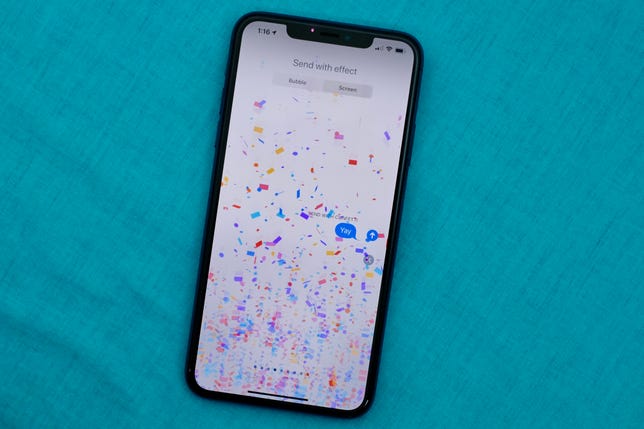
confetti-imessage

Apple's iMessage includes lots of fun animations that are invisible to anyone who isn't using an iPhone in your group chat.

Jason Cipriani/CNET

If supporting RCS is simply not going to happen in iOS, Apple could instead make the most of the limited bandwidth available within SMS and MMS. 

Apple is doing this for at least one feature in the iOS 16 public beta. Within group chats that are being handled over MMS, Apple's Messages app will translate reactions so everyone receives an emoji instead of a text about how someone "Liked" or "Loved" a message. Google's Messages app has similar functionality. 

Perhaps when photos and videos are sent over MMS, which was never designed for the multi-lens cameras on modern phones, Apple's Messages app could proactively suggest sending an iCloud link instead of a grungy compressed picture. This could work similarly to a feature currently available in Google Photos that allows users to select multiple photos and generate a web link to share with your friends or family members. 

And, similar to how Apple recently brought a version of FaceTime to the web for Android and Windows users, maybe it could create a version of iMessage that is viewable on the web. This could benefit its existing iPhone customers who would like to access iMessage from a Windows PC or Chromebook, while also allowing Android phone owners to view messages and other shared content the same way an iPhone user would. This idea would still be annoying for Android users, but it's better than receiving texts out of order during fast-flowing group chats. 

Build iMessage for Android

One of the most surprising revelations from last year's Apple v. Epic trial was that Apple had discussed building an iMessage client for Android back in 2013. But Apple executives passed on the idea over concerns about the competition. The possibility of Google buying WhatsApp worried Apple, and the company also feared that bringing iMessage to Android could make it easier for iPhone owners to switch to Google's phone platform, as the WSJ story pointed out. 

But much has changed in the years since, including Facebook's purchase of WhatsApp instead of Google. Although Apple has opened up some of its products like FaceTime, it also relies on its services to lock in iPhone customers.

On the other hand, bringing iMessage to Android could instead draw more customers to Apple's iPhone ecosystem. It's a strategy that worked way back in the 2000s, when launching iTunes on Windows considerably increased the customer base for Apple's music store. Sure, it might convince some iPhone customers to jump ship and switch to Android. But it could also help Apple reach a wider audience by exposing Android users to its products and services.


Source

Tags:


DIY faucet replacement: No, you don't need a plumber's help


DIY faucet replacement: No, you don't need a plumber's help

Like many others, due to the coronavirus I've spent the past eight weeks working from home, trying to teach my kids and staring at all of the home improvement projects I haven't had time to tackle. First up on the list: changing out an old two-handle faucet and replacing it with a fancier single-handle faucet with removable spray nozzle.

Fortunately, modern plumbing and faucet design have made changing faucets easy. It's a quick day project that makes a significant difference to the look of your space, and you can save lots of money by skipping the plumber and doing it yourself. 

So, here's a full rundown on how you can do just that. Just note that the faucet I installed isn't straight out of the box (we've had it around for awhile), so your experience may vary. 

chance-lane-faucet-install-9

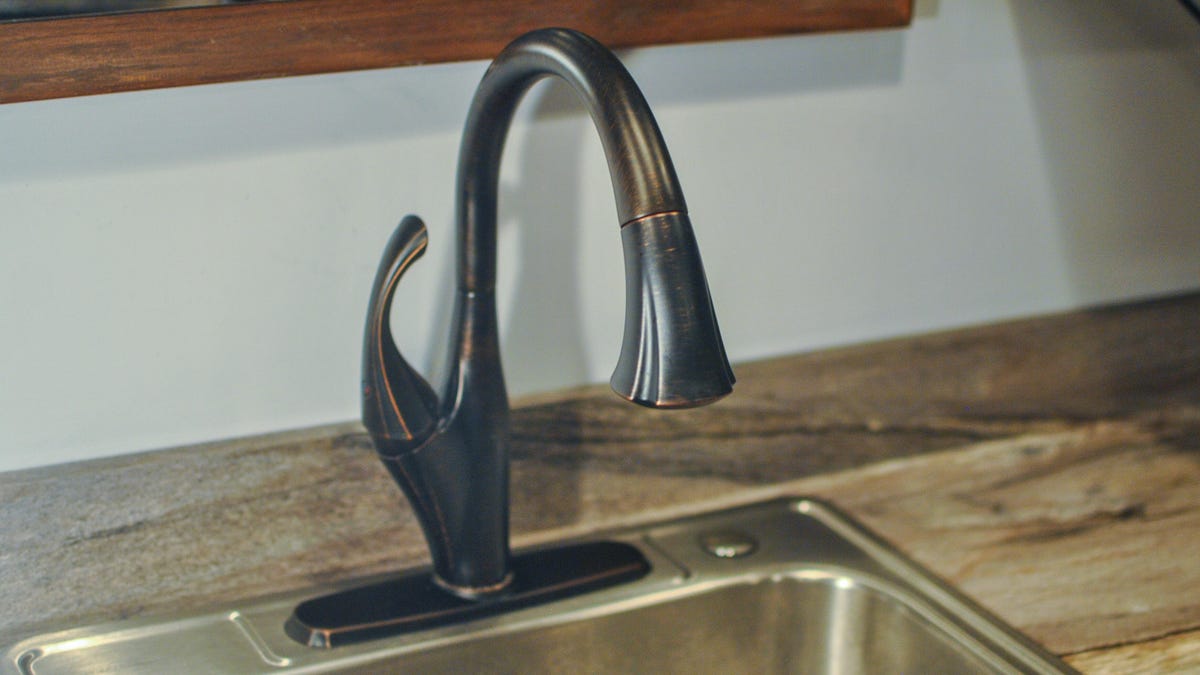
See ya later, two-handle faucet.

Chance Lane/CNET

Out with the old

First, shut off your water. You likely have two shut-off valves under your sink, one each for the hot and cold water supply lines. Turn off the water by turning these valves clockwise. You shouldn't need a wrench for this.

If there aren't any valves under the sink, then you'll need to follow the supply lines away from the faucet until you find a valve. You may end up shutting the water down at the water heater (and water heater bypass for cold), or the main valve. In this case, leave all the faucets on the lowest floor turned on to drain water from the entire system. 

After you've shut the water off, turn on the faucet you're changing to make sure the water is actually shut off: If water continues to flow, you have a faulty valve. With a bucket and towel handy for any residual water, use an adjustable wrench to remove the supply lines. Stabilize the valve assembly with a pair of slotted pliers as you loosen the water line connection; this will keep the valve and line from twisting and getting damaged. 

Once the valves are disconnected, you'll need to remove the old faucet assembly. It's held on by one or more retaining nuts under the sink, depending on the current configuration. These are sometimes difficult to access and you may need what's called a basin wrench. If you're lucky, a specific socket wrench may have been provided with the faucet. Once the retaining nuts are removed, you should be able to remove the old faucet from the sink. 

chance-lane-faucet-install-13

With the old faucet removed, we can slide the new one in and start working to get it connected.

Chance Lane/CNET

In with the new

There are a variety of configurations for faucets. Between the number of handles, spray nozzle types and even spacing of required holes, there are a lot of ways to customize. Before you buy a new faucet, consider your arrangement, specifically the current number and location of holes in your counter or sink. Sinks and countertops can be modified accordingly, but you'll need to do a little research prior to purchasing your new faucet. 

You might need a basin wrench or a specific socket wrench that came with your faucet in order to turn the retaining nuts.

Chance Lane/CNET

Start by putting the bracket that fits between the counter/sink and faucet in place. These will often have a foam underlay that will form a seal to help prevent water from seeping underneath the faucet assembly. Some faucets may differ, but the faucet I installed required minimal assembly prior to installation. 

Run the supply lines of the faucet assembly, followed by the threaded rods of the faucet, through the holes in your countertop or sink. Working underneath in the most comfortable position you can find (good luck), tighten the retaining nut with a wrench. 

If no socket wrench was provided with the faucet, and the space is tight enough to require a basin wrench, be extra-careful not to damage the faucet's water supply lines. It depends on the configuration of your particular faucet, but if the water lines are in the way of the retaining nut It could be beneficial to wrap them with nylon tape or some other protective material before doing this. Damaging water lines could cause a leak, and all of the mayhem that comes with that. You don't want that.

chance-lane-faucet-install-5

Be sure to take care when connecting your faucet to the water supply lines -- doing the job right can help you prevent leaks later on.

Chance Lane/CNET

Seal the deal with strong connections

Now, it's time to connect the faucet's water supply lines to the shut-off valve beneath the sink. With mine, the water lines were attached to the new faucet, but this isn't always the case. If you need to supply the water lines, it's recommended to change out hoses even if the ones you already have are compatible. If these hoses wear out and leak, you could have some trouble on your hands. 

You'll want to apply a thin wrap of Teflon thread tape in a clockwise direction (the same direction you will turn the nut to tighten) around the threaded male connections to lubricate the threads, which allows for a better seal. Finger-tighten the threaded nut valve connections -- then, while holding the valve assembly with a pair of slotted pliers, finish tightening the connection with an adjustable wrench. 

Slowly turn your water supply back on while checking for leaks. If the water flows normally and everything down below stays dry, then you're all set. 

chance-lane-faucet-install-8

Once the new faucet is in, remove the aerator from the spray nozzle and run the water for a minute or so to clear your plumbing of any debris.

Chance Lane/CNET

Finish with a flush

It's a good idea at this point to flush out your lines to get rid of any debris you may have loosened up in your water lines. To do so, remove the aerator from the faucet tip and let the water run for about a minute. Sometimes a tool is supplied with the faucet to make removing the aerator easier. If you can't remove the aerator, remove the entire nozzle head and let the water run for a bit. 

And that's it -- you can scratch that fancy new faucet installation off of your to-do list and move on to something else. I might recommend a nice glass of water and a nap, assuming the kids cooperate.

Read more: Best shower filter for 2021


Source

Tags:


Who's Winning America's Electric Vehicle Race?


Who's Winning America's Electric Vehicle Race?

This story is part of Plugged In, CNET's hub for all things EV and the future of electrified mobility. From vehicle reviews to helpful hints and the latest industry news, we've got you covered.

A tsunami of electric vehicles is set to arrive on US shores in the next few years. Practically every automaker around the world, from small boutique operations to goliath multinationals is hard at work developing battery-powered cars and trucks. But among America's traditional manufacturers, who's winning the EV race?

The old guard

GM, Ford and Stellantis (Chrysler, if you prefer), Detroit's Big Three automakers, are each spending vast sums of money to design and manufacture next-generation cars and trucks. GM is set to shell out more than $35 billion by 2025 to develop electric and autonomous vehicles. Through 2026 -- the year it expects to produce more than 2 million EVs -- Ford is on track to spend some $50 billion globally on the technology. As for Stellantis, this amalgamated American/French/Italian concern plans to invest around $32.5 billion (30 billion euros) in electrification and software through 2025.

American automakers are practically all-in on EVs, but plenty of their rivals are spending big bucks, too, from BMW and Mercedes-Benz, to Hyundai, Nissan, Volkswagen and Volvo. For the purposes of this article, however, to keep it from dragging on for days, we're focusing primarily on the Detroit Three.

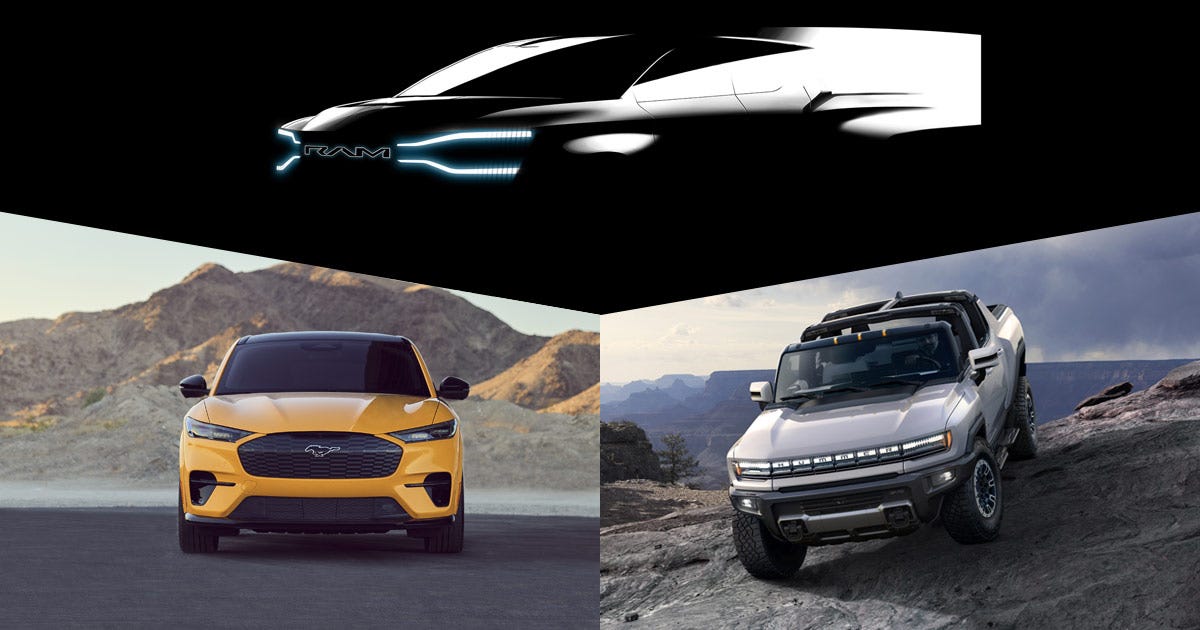
The new Hummer EV Pickup is absolutely massive.

GMC

The Tesla effect

But you can't talk about EVs without mentioning a certain company with an eccentric CEO and cult-like following. "There's no question Tesla's winning the race right now, by a wide margin," said Michelle Krebs, executive analyst at Cox Automotive. This organization keeps track of the most-shopped electric vehicles, and she said this company's products absolutely dominate the list. "It's going to be tough for anyone to catch up with Tesla," admitted Krebs.

Aside from strong sales, this American automotive upstart also leads when it comes to market capitalization -- being worth a record-breaking $1 trillion -- and mindshare. "Tesla, whether you want to give them the credit or not … [created] the modern EV market," said Edward Sanchez, senior analyst at Strategy Analytics. He noted that the Model S "flipped the script" and proved electric cars could be sexy, desirable and luxurious.

But not all is perfect in Musk-land. The company's been dogged by longstanding quality problems, it's facing labor woes at manufacturing plants, and is suffering from a lack of promised new products -- where's the Cybertruck, Roadster and Semi? No new launches are expected in 2022 and likely for part of 2023, so the automaker's lead will likely erode as more and more rival electric vehicles start showing up at dealerships. During the company's recent first-quarter earnings call, Elon Musk promised its robotaxi will be ready by 2024, but forgive us for not believing him.

Tesla is still the one to beat in the electric vehicle space. 

Mike Cutler/CNET

A classic rivalry

If Tesla is miles ahead of the competition, who's trundling along in second place? Sanchez said, "It's a very dynamic space," one that's "hard to armchair quarterback" because the situation changes from year to year and even month to month. Still, right now, he sees Ford pulling ahead, something echoed by other analysts.

According to Bob Gritzinger, editor-in-chief of Wards Auto, "Right now, for all appearances, Ford is in the lead. Give it a minute and I think you're going to see GM jump [ahead] in a hurry." The Blue Oval put some distance between itself and other domestic car makers, thanks to hit products like the Mustang Mach-E SUV and F-150 Lightning pickup, both of which are sold out, a happy problem for Ford, if not its customers. Still, the battery-powered E-Transit commercial van shouldn't be forgotten, either. "That's another win, an early win for Ford," said Gritzinger, as is the hot-selling Maverick compact truck, which is not offered as a pure EV but comes standard with a hybrid drivetrain.

Of course, it remains to be seen whether it's as well optimized as pickups built on dedicated EV platforms, but Ford was super smart getting the F-150 Lightning out as soon as possible. All-electric rigs like the Lightning could be absolute gamechangers and the Blue Oval has a huge advantage in this space right now.

The Ford F-150 Lightning is expected to be a game-changing EV.

Nick Miotke/Roadshow

One potential area of weakness for Ford, though, is Lincoln. The luxury brand is aiming for more than half of its global sales to be EVs by the middle of this decade, but almost nothing is known about the vehicles it plans to introduce. Lincoln did, however, just show off its new Star concept, a handsome SUV design study that previews some of the features and styling cues we can expect on the four EVs it plans to introduce by 2026. Fortunately, it sounds like we won't have to wait too much longer to learn about Lincoln's electrification strategy.

"Ford is definitely beating GM on sales and shopping data," said Krebs, leveraging its early-to-market advantage. GM has a lot planned, but it has to execute and avoid having issues like it did with the Chevy Bolt hatchback and its combustible battery pack, something Sanchez said severely humbled the automaker.

"There's no denying Ford's strategic advantage with Mach-E, being an early mover," noted Sanchez, but GM has a torrent of new EVs in the works, an unprecedented onslaught that has only just begun. The GMC Hummer EV Pickup is finally available and the Cadillac Lyriq SUV entered production about a month ago. Beyond those models, an all-electric Chevy Silverado is in the works, as are Blazer and Equinox utility vehicles as well as a Hummer SUV and even a new flagship-caliber electric luxury sedan, the Cadillac Celestiq. "My concern with GM is they're kind of almost going overboard," Sanchez said.

The Cadillac Lyriq SUV is one of many electric vehicles GM plans to introduce.

Cadillac

GM's much-publicized Ultium platform is set to underpin these upcoming vehicles, and many more. A relatively plug-and-play affair, "They're investing in one technology they'll be able to spread across the entire portfolio," explained Paul Waatti, manager of industry analysis at AutoPacific. With shared underpinnings, GM can bring a load of vehicles to market without doing a lot of costly and time-consuming reengineering work. Compared to Ford, Waatti said, "I think GM is a couple years ahead on the technology curve," though Ford is "catching up quick."

Stellantis: The dark horse

While those two automakers duke it out, the other leg of the Detroit Three stool is quietly plugging away in the shadows. "I think the dark horse in all this is Stellantis," said Gritzinger. "They've done a lot of work with hybrids and with their 48-volt system," he added. "I think they will be surprisingly strong once they start putting product out there, in large part because they're a European company and Europe is going 100% EV." Historically, Chrysler has almost always been smaller than its main rivals, but it's scrappy and willing to take risks, something that could give it a leg up in the electric vehicle space.

Sanchez said Stellantis is probably behind its major domestic rivals in EV technology, but this isn't necessarily a bad thing as "they're kind of taking advantage of the early adopters paying the price." As electric vehicles start to gain traction, the cost of batteries and related technologies should come down, which would be great for Stellantis. "Sometimes it's not always the worst thing to be late to the game," said Sanchez.

According to Waatti, AutoPacific forecasts that EVs will capture about 15% market share by 2027, something that leaves a ton of room for other propulsion systems, like plug-in hybrids. "Stellantis is probably taking that strategy, mostly because they're behind on straight-EV technology," he said. Plug-ins, like the new Jeep Grand Cherokee 4xe, give customers the best of both worlds: Silent, emissions-free (from the tailpipe, at least) motoring with the ability to drive cross-country without needing to charge. At least in the near term, this should be a good plan for Stellantis, "[and] from a business standpoint," explained Waatti, "They're making money on these right away."

Ram teased its upcoming electric pickup truck in this shadowy image.

Ram

It may not be as sweeping as Tesla's, but another potential advantage for Stellantis is its passionate fan base. Sanchez said even though the Dodge Charger and Challenger are absolutely ancient, their sales continue to grow. "If they can somehow leverage that enthusiasm for their EV models, they could surprise everyone."

Don't forget the smaller companies

Beyond Tesla and its Detroit rivals, a range of new independent automakers has come out in recent years. This old-school term was used decades ago to describe now-defunct brands like Hudson, Packard, Studebaker and Willys, but it works just as well in the 21st century. Today's independent makes include the likes of Fisker, Lucid and Rivian, companies that are focused solely on building EVs. Bollinger, Lordstown Motors and Nikola are in the same camp, too, though, for various reasons these brands have largely failed.

Whether any startup automakers will succeed remains to be seen. Waatti said they don't have the baggage legacy companies do, plus they're "something new and exciting," which could translate into more sales, though as Krebs noted, it's way too early to tell if any of these brands will take off.

For many reasons, the Lucid Air is a damn good electric sedan.

Lucid

This isn't to say today's EV independents aren't doing some great work. "I think Lucid, from a technological standpoint … I would consider them probably the closet peer to Tesla," said Sanchez. The company's Air sedan is not only beautiful and luxurious, it's loaded with clever features and offers storming performance. "[But] the big thing with Lucid is how quickly they can scale, that's the determining factor," Sanchez added.

Exciting times in the automotive industry

We're living in a transformative period as the car industry shifts from internal combustion to electric powertrains. Right now, Tesla is the undisputed American EV champion, a position it will likely maintain for some time. Waatti predicts, "They're still going to be the powerhouse into the end of the decade." But as more and more electric vehicles come out, Tesla's market share will almost inevitably decline. When GM's EV salvo hits, plus battery-powered offerings from myriad other companies, "All of a sudden, there's a lot of competition in your part of the sandbox," said Gritzinger.

As for the Detroit Three, it seems Ford is leading the electric vehicle race right now, thanks to its speedy introduction of the Mach-E and Lightning, vehicles that proved to be extremely popular. GM, however, probably has a technological advantage and could overtake its rival in the coming years once its flurry of new products launches. Of course, Stellantis is hard at work, too, and it's made some big promises, including the introduction of four dedicated EV platforms, though the finer details of its electrification plan are a little murkier. As Krebs said, aside from Tesla's dominance in the EV space, "The race has only begun."


Source

Tags:

Computer and Tech News

Search This Blog

Menu Halaman Statis

Contact Form

Name Email * Message *

histat