See If You Qualify for a Piece of Noom's $56 Million Class Action Settlement
See If You Qualify for a Piece of Noom's $56 Million Class Action Settlement
If you subscribed to the popular weight-management app Noom, you may be eligible for part of a $56 million class-action settlement regarding its automatic renewal and its cancellation policies.
Plaintiffs in the case accused Noom of violating consumer protection laws by getting customers to sign up for a free trial period without clearly disclosing its auto-renewal terms.
Founders Saeju Jeong and Artem Petakov did not acknowledge wrongdoing as part of the settlement, which they agreed to in February.
Read More: You Might Be Owed Part of Apple's $14.8 Million Class-Action Settlement
Noom did not immediately respond to a request for comment, but Petakov and Jeong said in a February blog post that settlement was "the best path forward as it allows us to focus our energy on delivering the best possible health outcomes for our Noomers."
Here's what you need to know about the Noom settlement, including how to find out if you're eligible, how you'll be paid and how much you can expect to receive.
What is Noom?
Noom is a subscription-based app to track food intake and exercise habits to encourage weight loss. The company emphasizes behavioral changes and users' emotions related to food instead of calorie counting or other techniques. It incorporates support groups and personal coaches.
A class-action suit claims Noom lured users in with a free trial but made it difficult to cancel when the trial was over.
Noom
What is Noom accused of doing?
A 2020 lawsuit claimed the weight-loss app, which was valued at about $3.7 billion in May 2021, misled customers with a "risk-free" trial without providing a straightforward way to cancel after the trial period ended.
Subscribers were instead sucked into automatic renewals, plaintiffs in Nichols v. Noom alleged, which charged them for up to eight months of nonrefundable payments totaling as much as $199, according to Reuters.
What was the settlement Noom agreed to?
Noom has agreed to pay out a total of $56 million to subscribers and provide an additional $6 million in subscription credits.
Who is eligible to receive a payment?
Anyone who subscribed to the Noom Healthy Weight program online or via the company's app between May 12, 2016, and Oct. 6, 2020, and did not receive a full refund or chargeback is eligible to receive a portion of the settlement.
No proof of purchase is necessary. But if you purchased a Noom subscription through iTunes or Google Play, you are not considered an eligible recipient, or "class member."
Class members may have been notified about the settlement via email or social media. If you think you qualify but didn't receive a notice, visit the Noom Class Action Settlement site or call 844-999-2466.
How much will class members receive?
A court must still sign off on the deal, but the settlement groups have been broken into two categories: Subclass A and B.
Subclass A members can expect an approximate payment of $167. They include:
Individuals who never completed their Noom enrollment but were charged anyway.
People who enrolled but can prove they never used Noom after the trial period.
Those who used Noom two times or fewer after the trial period.
People who stopped using Noom after day 58 of the subscription.
Customers who received a partial refund for a Healthy Weight Subscription.
Individuals who were California residents when they signed up for the Healthy Weight Subscription.
Class members who don't fit any of those definitions are considered part of Subclass B and will receive approximately $30.
In addition, the first 100,000 Subclass B Members who file a valid claim form can also receive a free month's subscription to Noom's Healthy Weight program, independent of any cash reward.
When is the deadline to file a claim?
Class members must file their claims by June 24, 2022. That is also the deadline to exclude yourself from the settlement and retain your right to sue Noom regarding the issues in the case.
If you do that, you can request to speak at the final approval hearing on July 11, but your notice of intent to appear must be postmarked no later than July 5, 2022.
If you don't file a claim or indicate your desire to exclude yourself from the settlement by June 24, you waive any right to payment or to sue Noom.
Has Noom changed any policies since the suit was filed?
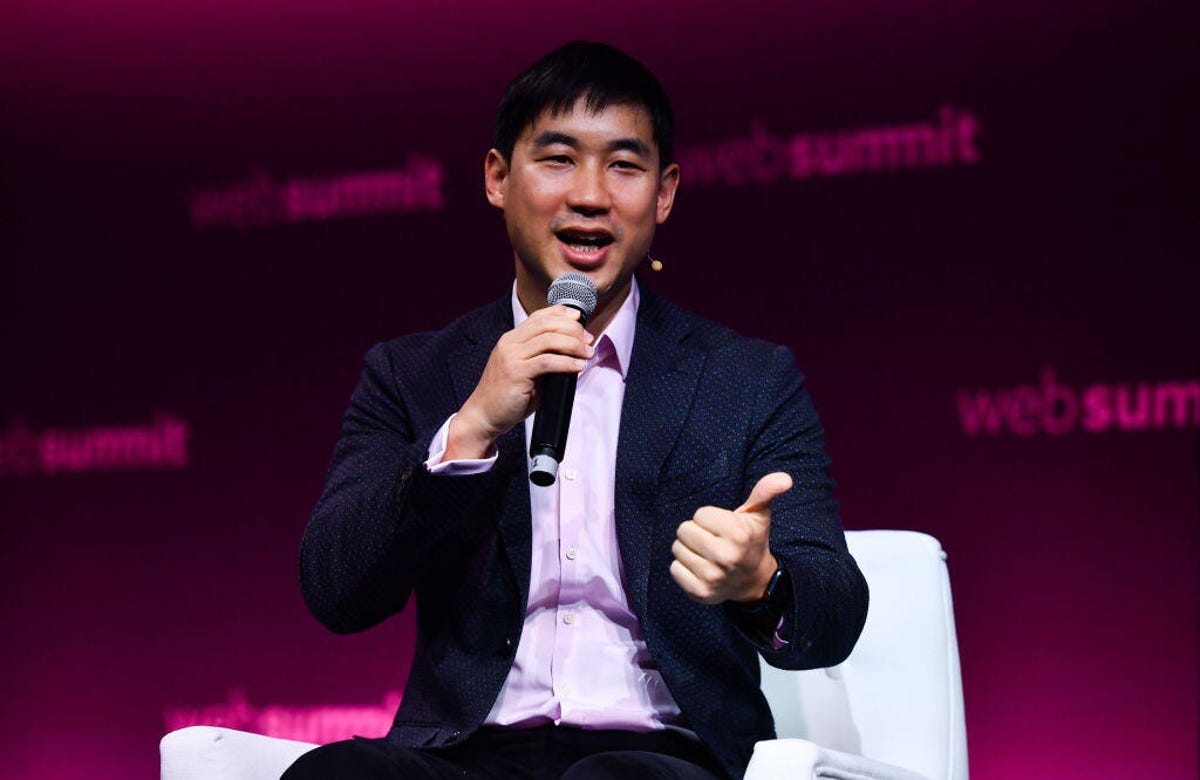
Saeju Jeong, co-founder and CEO of Noom
Sam Barnes/Sportsfile for Web Summit via Getty Images
As part of the settlement, Noom agreed to alter certain practices. In the February blog post, Petakov and Jeong said they have added a self-service cancellation option on both the Noom app and website.
In addition, they indicated Noom has increased support staff, added more phone and online chat options, simplified pricing and made subscription details "even clearer and more readily available for Noomers to refer back to."
How to set up Ring's Halloween-themed chimes and quick replies — CNET
How to set up Ring's Halloween-themed chimes and quick replies — CNET
Halloween is right around the corner. That means it's time to cue up the Netflix Halloween flicks, and dress up your fur buddies and kids (some Disney costumes are on sale now). Sure, you can always hang plastic spiders and drape cotton-ball cobwebs around the house to spice up your Halloween decor, but if you really want to get into the spooky spirit, try these new features from Amazon.
This year, you can use your Amazon and Ring devices to greet guests with creepy or nostalgic Hocus Pocus quick replies. Or play spooky sounds from your Echo-enabled device. You can even add a few hardware accessories to your video doorbell or Echo Show.
We'll show you how to enable Halloween-themed Alexa skills and other spooky tricks. Here are the latest Amazon features that were announced just in time for the holidays. Plus, you may be able to save on a new Echo Show or Ring Video Doorbell with Amazon's Black Friday-worthy deals. This story was recently updated.
Update your doorbell's Quick Replies
With Ring's Quick Reply feature, you can select an automated response to greet your guest if you can't answer. Your doorbell can say, "We can't answer the door right now, but if you'd like to leave a message, you can do it now," and "Please leave the package outside. If you'd like to leave a message, you can do it now." There are four other regular replies to choose from.
With all Quick Replies, you can watch your visitor leave a message in Live View or in your event history if you're a Ring Protect subscriber. But for Halloween, you can add quick replies from Hocus Pocus or other spooktacular replies. Here are a few we like:
"Tell us what brings you here... or we'll put a spell on you!"
"Boo! Leave us a message if you dare [evil laugh]."
"Just a minute! Feel free to park your broom."
"Please leave the package (and any hocus pocus) outside."
Here's how to set up Quick Replies and add Halloween ones:
Open the Ring app.
Tap the three lines on the top left.
Tap Devices.
Select the doorbell that you want to set up.
Tap the Smart Assistant tile below the doorbell image.
Tap Quick Replies.
Tap the blue Enable Autoreply button on the bottom of the screen.
Select your preferred default message from the list.
Set your message delay time from Right away to 20 seconds.
Tap Got It! to complete the setup.
Add Halloween chimes to your Ring doorbell
For Halloween, you can choose from a new set of holiday chimes. Options include bats, ghosts, howl, scream, spooky organ tones, a creepy laugh, a screeching cat and a creaky door.
To change your Ring Chime Tone:
Open the Ring app.
Tap the three lines on the top left.
Tap Devices.
Select the doorbell that you want to set up.
Tap the Device Settings.
Tap Notification Settings.
Tap App Alert Tones.
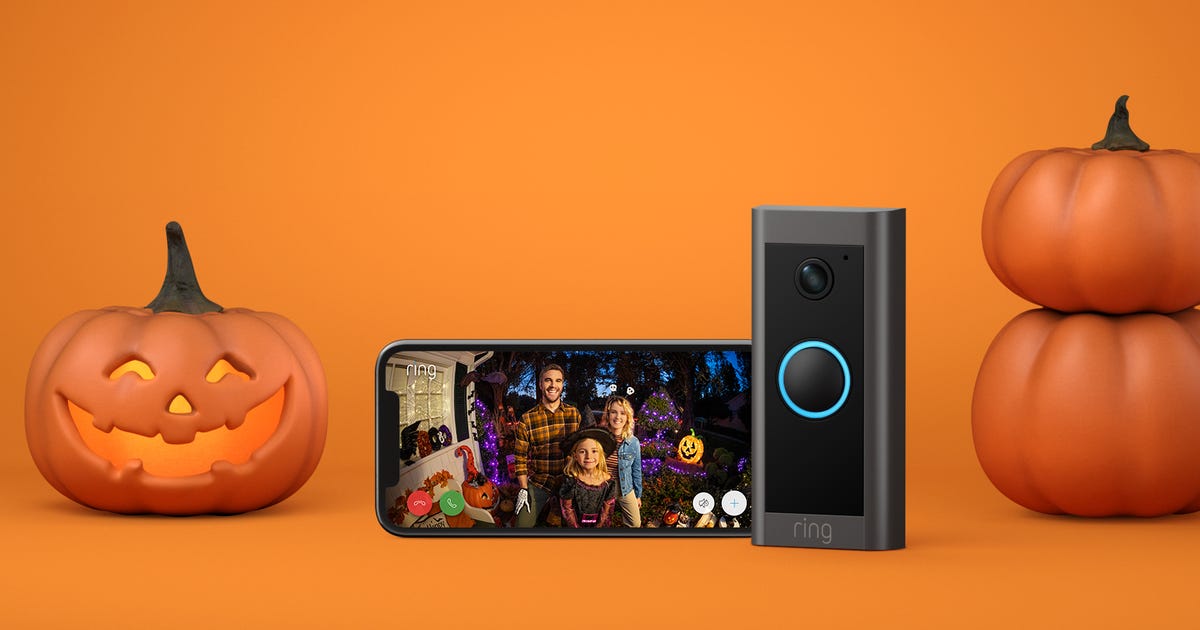
Ring can help take your spooky porch decor to the next level.
Ring
Give your doorbell a spooky faceplate
If you're really in the Halloween spirit, you can put a holiday faceplate on your Ring doorbell.
A bat design and a spiderweb design are available for the Ring Video Doorbell 2.
There are also faceplate options for the Video Doorbell 3, Video Doorbell 3 Plus, and Video Doorbell 4. Faceplates for all models cost $15 on Ring's website. There are even a few for the holiday season.
The latest generation of the Apple Watch will feature a full keyboard, the company said Tuesday, offering a new way to input text on the device.
Apple Watch 7 owners will have the option of tapping on the letters or sliding from letter to letter to type, and machine learning will predict the word. The company announced the news at its iPhone 13 event.
The Apple Watch 7 will also come with redesigned and enlarged buttons, making them easier to tap, particularly for alarms and stopwatch activity. It will also be able to fit 50% more text on screen than the previous model.
The first Apple Watch launched in 2015. Since then, it's become one of the iPhone's most important companion products. Although the company doesn't break out sales figures for the watch, the device reportedly sells better than the entire Swiss watch industry combined.
Tired from a long day? Want to relax on the couch in front of the TV, but don't want to endlessly scroll through shows to find something to watch? IMDb has an app for that. What To Watch is a new, free app meant to help Fire TV users decide -- you guessed it -- what to watch.
The app uses a series of mini games to help make that decision fun instead of stressful. Once you've finished a game, the app generates a list of recommendations, along with IMDb user ratings and runtimes for each title, to help you decide.
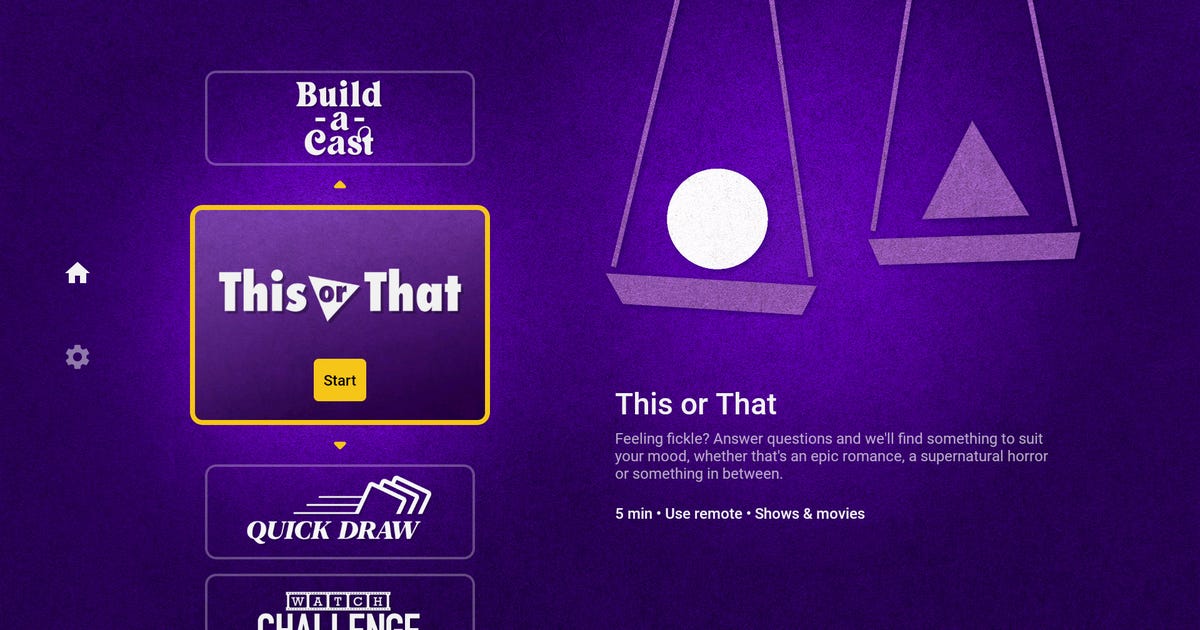
You can play Quick Draw, a game that shuffles through virtual "playing cards" with TV series and movie options. Or you can play This or That, where you'll answer questions to help narrow down recommendations. IMDb plans to launch more mini games in the app, too.
"The new IMDb What to Watch app for Fire TV makes it easy, fun, and fast for customers to discover trending titles and hidden gems," Nikki Santoro, IMDb chief operating officer said in a release on Thursday.
Some of the mini games available through the What to Watch app.
IMDb
IMDb, which is owned by Amazon, recently rebranded its IMDb TV streaming service as Amazon Freevee. The streaming service plans to add 70% more original content this year to its platform.
"Customers are increasingly shifting to streaming ad-supported premium content, and we have developed Freevee to deliver them highly sought content with half the commercials of traditional TV," Freevee director Ashraf Alkarmi said.
WWE Clash of Champions: Results, new champions, match rankings and full recap
WWE Clash of Champions: Results, new champions, match rankings and full recap
Emanating out of Charlotte, North Carolina, WWE's Clash of Champions pay-per-view was OK. It wasn't bad, per se, but there was nothing on the show that was truly exceptional, with most of the event being average to good. Seth Rollins was the MVP of the night, being a key part of the strong open and closing matches. Becky Lynch vs. Sasha Banks was on its way to being a standout match but was stymied by a poor finish.
Here's a quick rundown of highlights:
Seth Rollins is still Universal Champion, but he and Braun Strowman lost the Raw Tag Team Championships to Robert Roode and Dolph Ziggler. Not that it'll end up meaning anything, but Rollins was pinned fairly cleanly by Roode.
AJ Styles vs. Cedric Alexander was on the preshow, for some reason.
Becky Lynch retained her Raw Women's Championship via DQ, lengthening her feud with Sasha Banks.
Roman Reigns vs. Erick Rowan was a waste of time -- until Luke Harper returned.
Below you'll find all the results of the night, as well as match recaps and ratings. See you next month for WWE's Hell in a Cell event, which will be headlined by Seth Rollins vs. Bray Wyatt.
Seth Rollins retains his Universal Championship
Hot start, with Strowman bulldozing Rollins and going for his powerslam finish. Rollins escapes, works over Strowman's legs and hits three superkicks followed by a frogsplash. Rollins is so good. Two count.
Good action, with Rollins springboarding all over the place and Strowman showing great intensity. The crowd is quiet, tired from a long and only OK show. Strowman hits his running shoulder tackle on the outside twice, but Rollins sidesteps him on the third one. Strowman crashes through an announce table, and Rollins hits dual suicide dives. The two end up fighting on the turnbuckle, and Strowman eventually hits a frogsplash from the top. Props.
We get a light, polite "this is awesome" chant. Rollins locks in a sleeper hold but Strowman rolls out. Rollins hits a curbstomp for a one count. He hits another for a two count. A third stomp for another two count. Rollins goes for a fourth but Strowman counters, hoisting him up for a powerslam. Strowman's leg gives out, Rollins nails a pedigree and then a final curbstomp for the pin.
After the match Rollins is attacked by Bray Wyatt, aka The Fiend. They'll wrestle next month at Hell in a Cell.
Rating: 3.5 stars. Very similar to SummerSlam's main event between Rollins and Brock Lesnar, but not as good. Suffered from a flat crowd, but still a solid main event.
Erick Rowan beats Roman Reigns (!)
Not much to this match. It's no DQ, so it's just a bunch of brawling outside the ring. Rowan has improved his intensity a great deal, but the crowd doesn't buy him as a threat to Reigns. Which is a shame, because the match was just Rowan beating down Reigns, trying to convince the audience he's a threat to Reigns.
One moment did impress the crowd. On the outside, Reigns jumps from the steel stairs for an elevated Superman Punch, but Rowan counters by grabbing him by the throat and pulling him up for a huge powerbomb through an announcer's table. This gets Rowan a 2 count.
Match ends when a returning Luke Harper blocks a spear attempt from Reigns. Harper and Rowan double team Reigns. Rowan gets the win.
Rating: 1.5 star. Cool powerbomb spot and it's awesome that Luke Harper, who is awesome, is back. Other than that, this was not good.
Kofi Kingston retains his WWE Championship
Orton and Kingston start slow. This is likely because they're following a hot match and want to restart the crowd, but it's also vintage Orton.
The wrestling here is actually very tight. The two exchange snug shots, and Orton ends up bumping Kingston out of the ring. He then follows up with suplexes all around the outside area, including two on the announce table.
The pace slows down though as Orton picks apart Kingston. Eventually Kingston mounts a comeback, but it's not a particularly vigorous one. He goes for a Trouble in Paradise, but Orton counters with a nice neckbreaker. Kingston gets some of that missing fire, though, with a huge over-the-top-rope dive.
Orton regains control and there's more slow-paced dissection. He sets up an RKO but Kingston counters into a rollup. Kingston starts a comeback but is cut off with an RKO outta' nowhere. Kingston gets a foot on the rope at 2. Orton goes for his infamous punt but Kingston dodges and nails a Trouble in Paradise to retain.
Rating: 3 stars. A lot of nice wrestling here, but nothing remarkable.
Sasha Banks beats Becky Lynch via DQ
Crowd reacts big to Lynch, and is more into this match than the last few. Lynch starts out on top, but once Banks gets control the crowd breaks out into loud "Let's go Sasha!/Let's go Becky!" dueling chants.
After Banks worked over Lynch for some heat, Lynch mounts a comeback. She gets cut off in spectacular fashion though, with Banks countering a flying clothesline with a Banks Statement submission. Lynch powers out and hits an exploder suplex. Crowd has been more quiet, but wakes up with more dueling chants.
The two women trade submissions in the center of the ring, Banks going for the Banks Statement and Lynch the Disarmer armbar. Lynch ends up on top, getting her submission, but Banks gets her foot on the rope. Good stuff here. Banks nails double backstabbers and rolls Lynch into a Banks Statement for an intense false finish, but Lynch gets the rope break.
Banks villains it up, tossing in a chair to distract the ref and then, while the ref isn't looking, hitting Banks in the torso with another chair. She follows up with a shining wizard for a two count. The ref accosts Banks for using a chair and then Lynch takes a chair herself and swings for Banks, but Banks ducks and Lynch hits the ref.
The two then brawl into the crowd. Lynch uses the stair rails to put Banks in a Disarmer armbar, which was gnarly. Banks and Lynch brawl into the backstage area, where Lynch smears Banks with mustard, and eventually come back to the ring. We're told by Michael Cole that Lynch has been disqualified for hitting the ref. Cool. Inside the ring Lynch destroys Banks with a chair.
Rating: 3.5 stars. A very good match with a weak finish. In fairness, Lynch looked like a badass babyface tearing apart Banks and leaving as a defiant champion, but that's in spite of an uninspired ending.
Still the champ.
WWE
Shinsuke Nakamura retains the Intercontinental Championship
After The Miz' entrance, Sami Zayn comes out to berate the audience, talk smack about The Undertaker and to introduce Shinsuke Nakamura. It sucks that Zayn is a manager, because he's such a terrific wrestler, but he is a fantastic manager.
Nakamura and The Miz open with some chain wrestling. Zayn immediately takes the mic and starts commentating from the side. After about 30 seconds of amazing commentating, Zayn's mic gets cut off.
Miz works over Nakamura's leg throughout the match, leading up to a Figure Four submission that gets a nice pop thanks to this being Charlotte, North Carolina, aka Flair Country. Nakamura grabs the ropes to break up the pin. Zayn distracts Miz, allowing Nakamura to his a modified Kinshasa to the back of Miz' head for a 2 count. Miz regains control and nails a Skill Crushing Finale, but Zayn distracts the ref.
Ending comes as Miz chases Zayn around the ring. Nakamura cuts him off, then hits a Kinsasha in the ring for the win.
Rating: 3.25 stars. This match had a slow start, got very good towards the end but had a finish that made The Miz look dumb. Miz's offense also looked weak at points.
Nikki Cross and Alexa Bliss retain Women's Tag Titles
Alexa Bliss comes out with a Harley Quinn-inspired look tonight.
Nikki Cross starts the match with Mandy Rose, who after some taunting from Cross tags in Sonya Deville. Eventually Rose is back in the ring against Bliss. Some sloppy stuff here, some of Bliss' forearms and slaps look great but there was some conspicuous mishaps too. The two were at some points a second or two out of sync.
R-Truth runs into the ring and is chased by the 24/7 Championship crowd for a quick distraction. Bliss tries to rollup Truth, but he kicks out and runs into the crowd. This sentence must be completely incomprehensible to someone who doesn't regularly watch Raw.
Deville and Rose hit a double-team move on Bliss, but the pin was broken up by Cross. Bliss tags in Cross, Cross scores the pin on Rose after a top-rope neckbreaker.
Rating: 2 stars. Not bad, a well laid out match (except for the 24/7 distraction), but there was a lot of sloppy wrestling here and the crowd wasn't particularly interested.
The Revival defeats The New Day
The Revival are awesome and The New Day very good, but these teams are struggling to get the crowd alive. The New Day dominate until The Revival out Xavier Woods and double team Big E. The crowd did wake up when Big E, after around 5 minutes of being beaten down, tagged in Woods.
Woods runs wild on The Revival, but is cut off when he gets kicked in his injured leg. Big E comes in for a nice sequence that ends up with The Revival hitting a Shatter Machine on the outside. Scott Dawson and Dash Wilder then pick apart Woods in the ring and nail him with a Shatter Machine. They could go for a pin but decide to work over Woods' leg more.
Dawson puts Woods in a submission lock and Woods taps out.
Rating: 2.75 stars. Some nice wrestling here, but the middle section of the match felt plodding and the crowd, though sporadically invested, on the whole wasn't super into it.
Bayley retains her SmackDown Women's Championship
Flair opens hot with a big boot to Bayley, who then retreats out of the ring. Flair chases Bayley around and, back in the ring, hits her with some chops and some snug-looking strikes. Outside the ring Flair throws Bayley into the ringside barricades. Pretty gnarly looking. Here the crowd pipes up with a "Let's go Charlotte!" chant.
Flair starts working over Bayley's leg. The story of the match so far is that Flair is murdering Bayley. Bayley reteats to the corner and the ref stops Flair from keeping the offense up. Bayley takes the bottom turnbuckle padding off, pulls Charlotte into it in an illegal move and, surprisingly, gets the 1-2-3.
After the match Bayley legs it to the back.
Rating: 2.5 stars. This match actually told a coherent story. Flair was killing Bayley, who blatantly cheated to retain her title. The hero looks strong, the villain looks evil. It was too short to be a great or even good match, but was solid for what it was.
Robert Roode and Dolph Ziggler are Raw Tag Champions
Good opening match here. It opens with Strowman dominating both Roode and Ziggler, then tagging in Rollins. Ziggler turns the tide with a wicked DDT on Rollins outside the ring. The crowd was a little quiet at the beginning, but really got into the match as the bad guys kept cutting off Rollins from tagging in Strowman.
Big pop when Strowman gets tagged in. He runs wild -- literally running Ziggler and Roode down on the outside -- but Ziggler rakes his eyes and double teams him with Roode. Eventually Strowman tags in Rollins. Amazing hot tag. This guy was flying all over the place, springboards inside the ring, suicide dives outside, more springboards inside.
Match ends when Roode sets up a Glorious DDT and Strowman bumps Roode into Rollins. Strowman and Ziggler take a tumble outside, and Roode hits a DDT on Rollins for the win.
Robert Roode, bottom of the card a month ago, pins the Universal Champion.
Rating: 3.5 stars. Slow start, but ultimately a solid match with a very good final few minutes.
Your new tag champs.
WWE
Preshow results
AJ Styles defeats Cedric Alexander in a United States Championship match: The first surprise of the night is that this match was on the preshow. Styles beats Alexander in a 5-minute match.
Drew Gulak retains the Cruiserweight Championship: Gulak beats Humberto Carrillo and Lince Dorado in a triple-threat match.
Try This Surprisingly Smart Lightbulb Tip (Your Uber Driver Will Thank You)
Try This Surprisingly Smart Lightbulb Tip (Your Uber Driver Will Thank You)
This story is part of Home Tips, CNET's collection of practical advice for getting the most out of your home, inside and out.
Light bulbs that change colors on command are a smart home staple, but there aren't a lot of obvious ways to make them a practical part of your day-to-day. Sure, they're lots of fun for a kids room, and useful to have at Halloween or when you're throwing a party, but how often have those colors actually come in handy?
The truth about color-changing smart bulbs is that it's all about how -- and where -- you use them. If you've been looking for new ways to put them to work, there's one spot at home you might not have considered, and I'm confident that it's a place where you'll get plenty of practical use out of those automated color changes.
See that blue light on the porch? So can your delivery driver -- and in a multiunit home like this one, it's a great way to help them find the right door.
Ry Crist/CNET
Stick a multicolor smart bulb on your front porch
Or your stoop. Or your front window. Or the light in the yard -- wherever, just so long as you've got a color-changing bulb that people can see from the street. That last bit's important, because we're going to use this thing as a signal that helps people find your house -- specifically, the rideshare and delivery drivers trying to earn a living by bringing meals, groceries and other home goods to your doorstep.
With Americans staying home more than ever during the past two years, delivery services like those have seen massive growth. If you're anything like me, you've come to appreciate the occasional (OK, more than occasional) convenience of a well-timed burrito delivery in the middle of your remote workday. With a color-changing smart bulb outside your home, it's easy to help those drivers find your address -- just change the color to something distinctive when you order and make a note to your driver to look for the colored light. You'll be doing your driver a solid, and helping ensure that your food gets to the right place, too.
Along with deliveries and pickups, it's also a useful trick when you're having people over for a social visit. And, even when you aren't using it to help people find your place, a bulb on your porch that you can set to turn on automatically whenever the sun goes down is great to have on hand, not to mention the fact that you'll have a nice head start on the Halloween decorations. Here's how to get it set up.
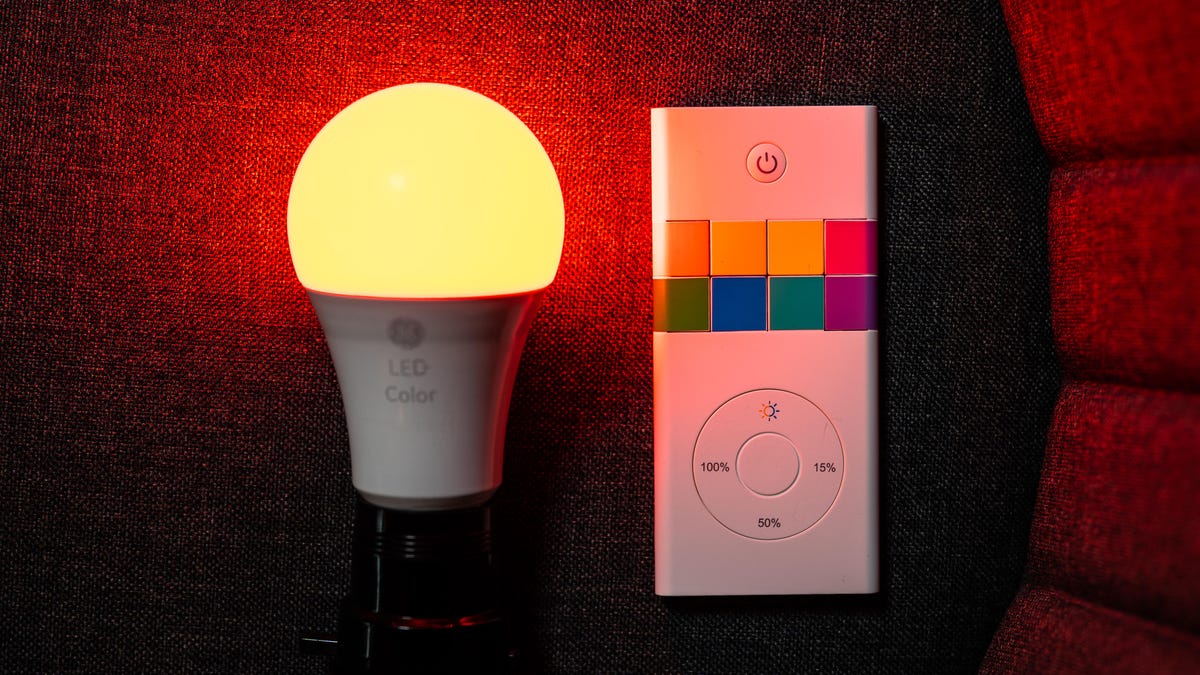
Just about any color-changing smart bulb will work -- and if you don't want your bulb to be smart, a nonconnected color-changing bulb with a remote like this one from GE will do the job, too.
Chris Monroe/CNET
Step 1: Pick out a bulb
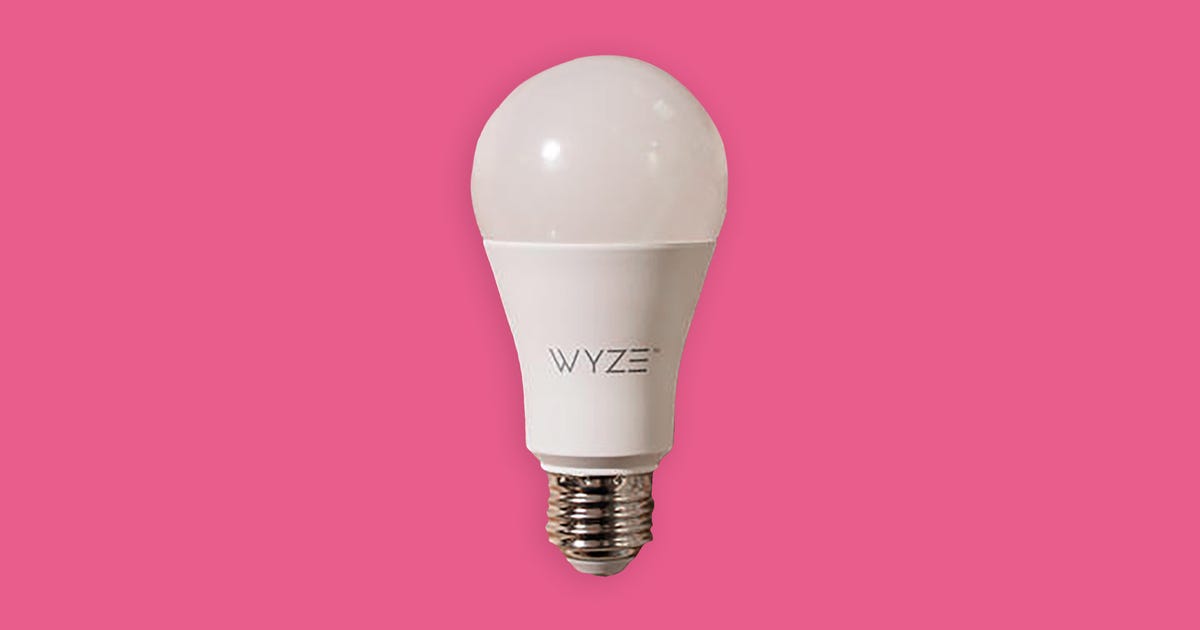
You've got no shortage of options here. Big names like Philips Hue and Lifx will get the job done, but less expensive bulbs from Sengled, GE Cync, Wyze, TP-Link Kasa, Govee and others will work, too, so in most cases you won't need to spend more than $15 per bulb or so. If you need a floodlight instead of a standard, A-shaped bulb, you'll find lots of options, as well: Cree, Feit Electric, Lifx, Philips Hue, Sengled, Wiz and others all sell them, and most cost less than $20.
Any color-changing bulb will do, but you'll want to put some thought into how you plan to control the thing. All of them should let you change the color from your phone, using an app, but if you already use voice assistants or home automation platforms in your house -- Alexa, Google Assistant, Apple HomeKit, SmartThings -- you'll want to make sure to pick a bulb that works with your setup. Later this year, smart bulbs that support Matter, a new universal smart home standard that works with all of those other platforms, should start hitting the market, too.
And, if you aren't interested in smart bulbs that you can control with your voice or with an app, that's fine: Just look for nonsmart color-changing bulbs that come with a remote, like this one from GE. Again, you shouldn't need to spend much more than $10.
Step 2: Pair with your bulb
This part's easy -- just screw the bulb in where it needs to go, turn it on, download the app to your Android or iOS device, and follow the instructions to pair it with your phone.
Keep in mind that different bulbs connect in different ways. If it's a Wi-Fi bulb, it'll pair directly with your home network via your router. If it's a Bluetooth bulb, it'll pair directly with your phone whenever it's within Bluetooth range. Zigbee bulbs need a Zigbee hub on your network that's capable of receiving the signal and translating it into something your router can work with.
Once you've connected, you can use the bulb's app to change the color yourself whenever you're expecting a delivery. If your bulb supports voice commands via Alexa, Google Assistant or Siri -- and just about all of them do at this point -- the app should offer instructions on how to set that up, as well.
Most meal delivery apps have a field where you can leave instructions for your driver at checkout. This is where you want to tell them to look for the light.
Screenshot by Ry Crist/CNET
Step 3: Give your driver a heads up
Don't forget to loop your driver in on the plan. Before you place your order or request a ride pickup, look for a field where you can leave special instructions for your driver -- tell them to "look for the blue light," and you'll be all set. Same goes for pizza delivery if you're ordering online, or via the brand's app.
And that should do it -- a color-changing bulb on the porch that'll help delivery drivers find your front door each and every time you order. It's novelty meets practicality, all without costing very much, and a great way to put those colors to work.
For more tips, check out five inexpensive ways to tech out your patio, and which appliances you should unplug at home to save money.
Instagram Live Streamers Can Assign Their Own Moderators to Clean Up Chat
Instagram Live Streamers Can Assign Their Own Moderators to Clean Up Chat
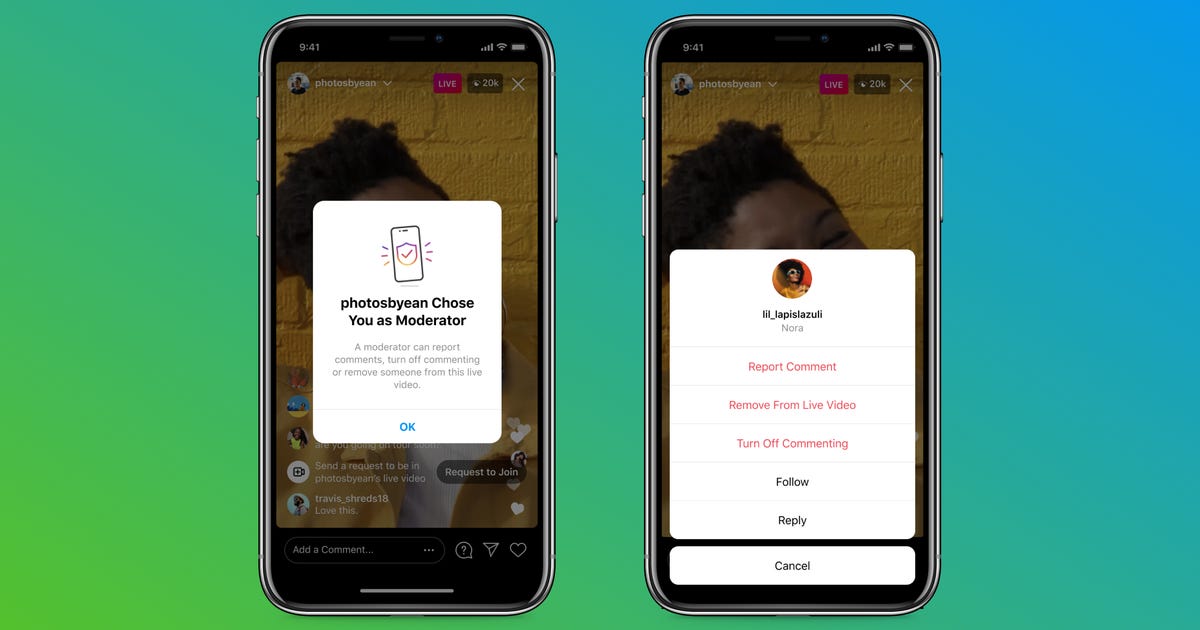
Instagram Live streamers can now assign someone to moderate their stream as it happens, freeing up broadcasters to focus on their content.
Instead of having to do all the moderating themselves, streamers can deputize someone to clean up chat by reporting comments, turning off comments for some viewers, or even booting them from the stream entirely. To assign their moderator after starting an Instagram Live, streamers tap the "..." button in the comment bar and either choose from a list of suggested accounts or manually search for one.
Rumors of assigned moderators first appeared in November when leaker Alessandro Paluzzi tweeted screenshots showing the feature in action. Instagram says it's adding the capability to help streamers keep their broadcasts safe and civil for them and viewers.
Read more: Instagram Boss Says App Will 'Rethink What Instagram Is' in 2022
Instagram parent company Meta has a lengthy history with moderating its social networks and had struggled with policing extreme content during the pandemic on Facebook. Even so, what it does allow has been challenged, as studies linked youth use of Instagram along with rival social media platform TikTok with body image and eating disorders.
The company slowly added more tools for administrators of groups to moderate comments themselves back in June, though reports later in the year said self-harm content is easily found while bullying and harassment are still prevalent on Meta's social media platforms. Still, adding livestream moderators -- especially trusted accounts who can clean up chat and remove viewers as aggressively as needed -- gives content creators tools to keep their own spaces safer than before.
Windows 11 Regret? You Have 10 Days to Go Back to Windows 10
Windows 11 Regret? You Have 10 Days to Go Back to Windows 10
Microsoft has finished rolling out its latest OS, Windows 11, to compatible devices. Windows 11 offers some handy new features, along with several significant changes compared to Windows 10. But if you make the leap and download Windows 11 -- and then regret it -- there's an easy way out. That is, as long as you hurry.
After downloading and installing Windows 11, you only have 10 days to revert your system to Windows 10. If you roll back to the old OS, all the information stored on your computer will automatically repopulate there, so you won't have to worry about any files disappearing.
Note that if you haven't already downloaded Windows 11, you don't need to install it right away. You actually have until 2025 to make your decision -- that's when Microsoft says it'll end support for Windows 10.
Read more: What to Do If You Get a Windows 11 Installation Error
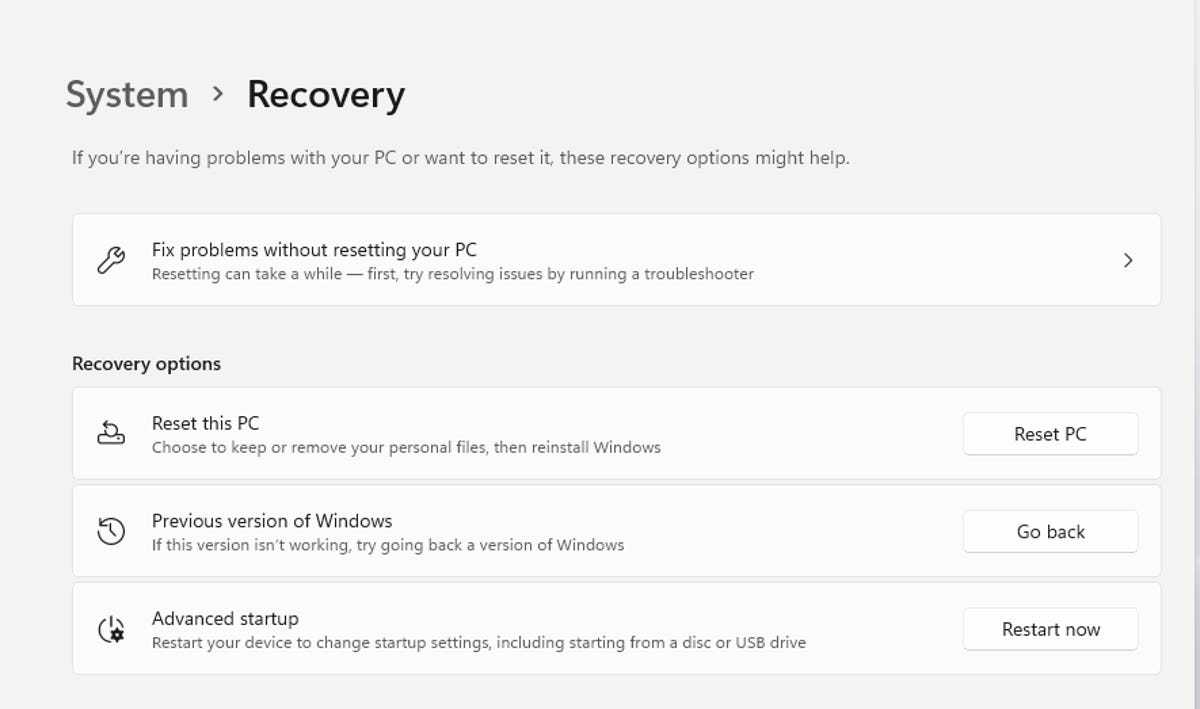
Here's how to make the switch back to Windows 10: Start menu > Settings > Windows Update > Advanced options > Recovery > Previous version of Windows (you may see Go back instead). That's it!
Once 10 days have passed, you can still go back to Windows 10, but it'll be a little trickier: You'll need to back up your data and perform what Microsoft calls a "clean install" of Windows 10 on your PC. Or, if you had backed up your system before installing Windows 11 in the first place, you can restore from that.
Should you choose, you can stick with Windows 10 for four more years until Microsoft stops supporting it in October 2025. If the 10-day countdown sounds new, that's because Windows 10 initially launched with a 30-day window for easy rollbacks.
Take a 360-degree GoPro ride on winning horse American Pharoah
Take a 360-degree GoPro ride on winning horse American Pharoah
The view from American Pharoah includes this other horse. Video screenshot by Amanda Kooser/CNET
Most of us are simply physically too big to even think about becoming professional horse jockeys and riding a fleet-footed equine to Triple Crown glory. You don't have to watch your weight or spend years in training to hitch a ride on American Pharoah, the latest winner of horse racing's elusive trifecta of the Kentucky Derby, Preakness and Belmont Stakes. A new GoPro video lets you saddle up and go.
The video was taken on July 18 at Del Mar Race Track in California during a morning workout. It was recorded with a GoPro Hero4 camera and released on the GroPro YouTube channel Thursday.
The video starts off with a view of the grandstands, moves to the stable area and then steps out onto the track itself. You can spin the view around to see other horses working out, flashes of American Pharoah's tail and the tips of the horse's bouncing ears in front.
If you want to access the full 360-degree swiveling-head features, you'll need to use the Chrome browser or download the Kolor panoramic video app. The interactive footage is a fun way to show off the capabilities of the Hero4 combined with Kolor's video-stitching services.
The jockey's-eye view is exhilarating and the beat of the thoroughbred's hooves is mesmerizing. It's not quite the same as being in the middle of an actual race, but it does give you a sense of the buzz and excitement surrounding the horse. American Pharoah is scheduled to race again on August 2 at Monmouth Park in New Jersey.
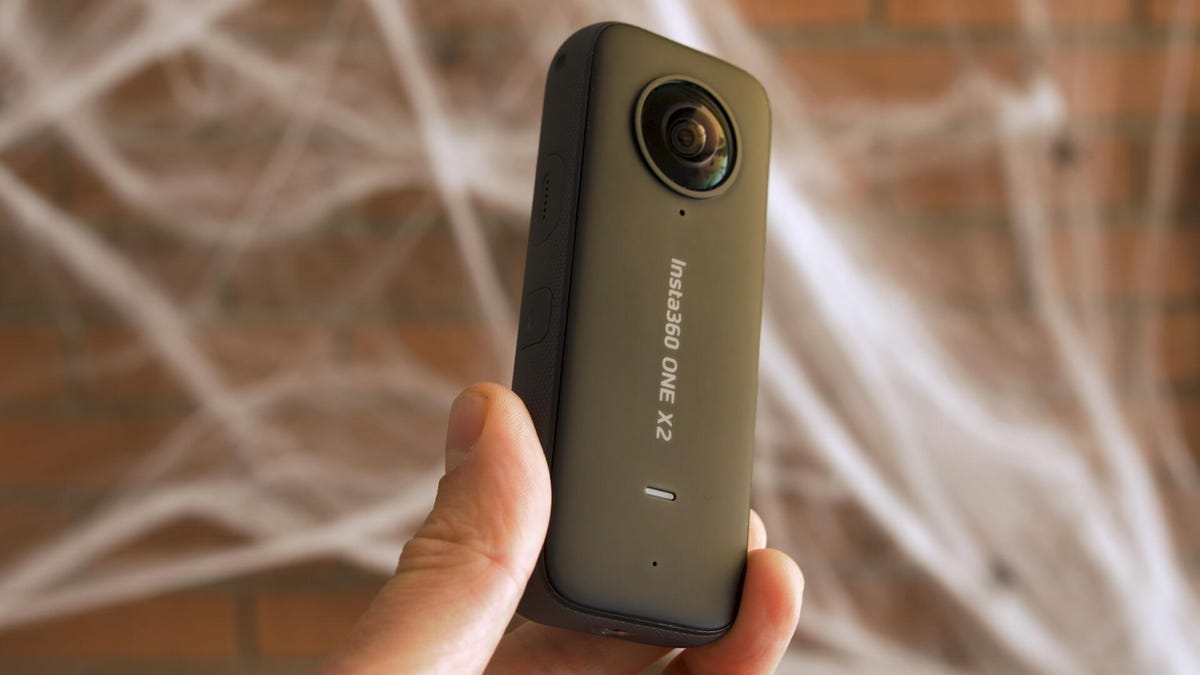
Insta360 One X2 is a 360 camera that unlocks your creativity for $430: Hands-on
Insta360 One X2 is a 360 camera that unlocks your creativity for $430: Hands-on
When Insta360 released its One R camera at the beginning of 2020, I expected that to be the end of the road for its compact 360-degree camera, the One X. After all, the modular design of the One R lets you easily swap out its regular action-cam-style wide-angle camera for a dual-lens camera module that could do all the things the One X could, giving you two (or more) cameras in one, so to speak. But, it turns out, there's still plenty of room for a One X2 in the lineup.
Nic Henry/CNET
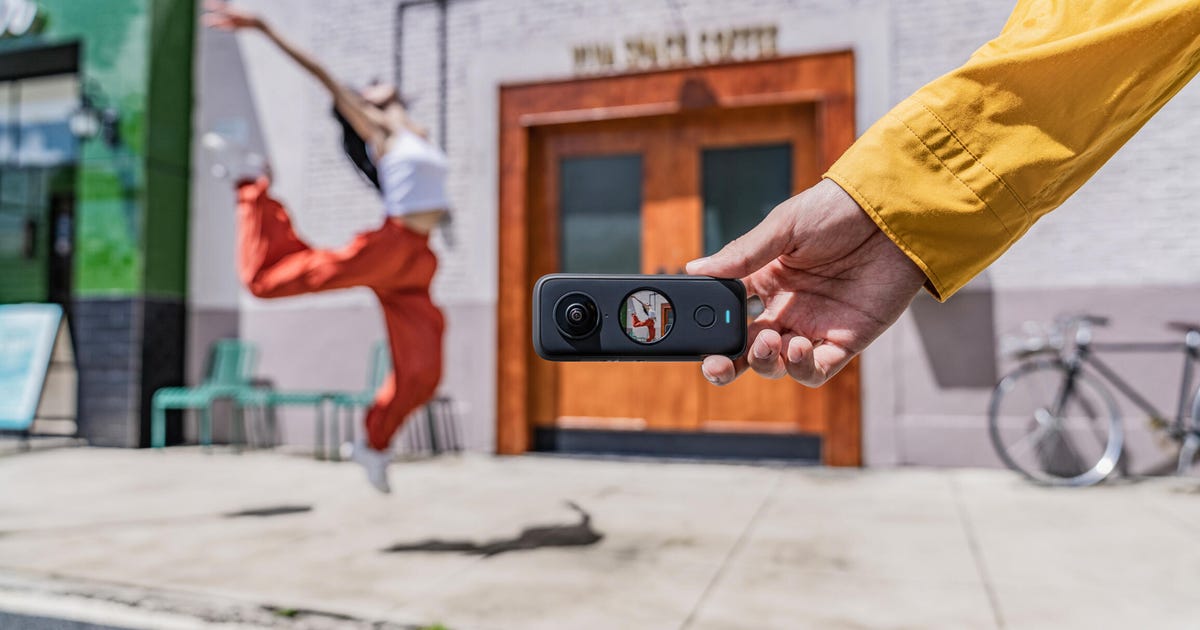
The One R is designed to be a versatile all-in-one action cam. Costing $430 (about £330 or AU$600 converted), the One X2 is more about having the ultimate pocket camera for photos and videos, and the updates compared with its predecessor are plentiful. It might not be modular, but the X2's design has other advantages.
The One X2's shape makes it way easier to slip in your pocket and the company includes a protective sleeve to keep its dual lenses scratch-free, at least while it's stashed. It's also more comfortable for handheld use and it's now waterproof to 10 meters (33 feet) without a housing -- twice as deep as the One R. And it has a longer-lasting battery to boot.
The X2 has a new circular touchscreen, so this time around -- no pun intended -- you can see what you're shooting, change settings and keep tabs on things like shot count, battery life and shooting modes. You can also tap on a subject for tracking and the upgraded Deep Track algorithm lets you lock onto humans, animals and other moving objects and will keep them centered in the frame.
The 360-degree image quality is a step up from the One R's, too, despite the fact that they both go up to 5.7K resolution at 30 frames per second. The bit rate goes up to 100Mbps, and the camera has re-engineered color science, better stabilization and improved audio quality with two additional mic, bringing the total to four.
Here's a frame taken from the 5.7K video using the invisible selfie stick.
Nic Henry/CNET
While the One cameras are known for their cool Bullet Time mode that slows down the action while the camera pans 360 degrees around you, the camera does that and much more. A Steady Cam mode lets you shoot with a single X2 lens so you can capture a stabilized traditional ultrawide movie clip. Then there's a new InstaPano photo mode that snaps panoramas without you having to move the camera; just a single press of the shutter release gets it done. There's also an updated MultiView mode with face tracking that creates a picture-in-picture video with different views from the two camera lenses.
Other additions include a Vivid color setting that joins its Standard and Log options; a PureShot mode for better low-light pics and AquaVision for underwater color correction; voice controls; and 360-degree live-streaming as well as webcam capabilities.
Still, my favorite part of using Insta360's One cameras is the Shot Lab tutorials. They show you how to get the most from the cameras and, while the effects might not be ones you use all the time, they can definitely kick-start your creativity.
New Universal Music band Kingship is a few bored, virtual apes who're also NFTs
New Universal Music band Kingship is a few bored, virtual apes who're also NFTs
One of the world's largest music labels is exploring entertainment in the metaverse. Universal Music Group is already home to some of music's biggest names, but now its label 10:22PM is launching the music group Kingship, made up of some famous NFTs, or nonfungible tokens.
Four virtual apes from the Bored Ape Yacht Club collection of NFTs comprise a "metaverse group," Universal said Thursday. The team behind Kingship will eventually put on performances and release original music.
"Just as we would with any artist or creator, my team and I will work with Kingship to sharpen their vision and develop their unique sound," Celine Joshua, founder of the label 10:22PM, said in a press release. "Each member of the group has their own story and personality that influences and contributes to Kingships's overall narrative."
10:22PM will create backstories for the apes and eventually sell NFT performances, providing buyers with unique musical experiences, Bloomberg reported. Alongside concerts in the metaverse, the group represents a "new area of NFT ownership," said Jimmy McNeils, the owner of the four NFTs that make up the group.
NFTs have already been big money for some owners. The Bored Ape Yacht Club is a collection of thousands of unique digital artwork depicting, well, bored apes. At the end of October, one sold for $3.4 million. Two of the NFTs in Kingship are currently valued at about $125,000, according to OpenSea, an online NFT marketplace.
It's unclear when the first performance or musical NFT will be available to potential fans. Universal Music Group didn't immediately respond to questions about any timeline.